Close
Xpertcodes – Where Expertise Meets Innovation | Code | Consult | Expert
A website is no longer just an online business card.For many businesses, it is the first place where potential customers learn about the company, compare services, check credibility, and decide whether to make contact.
That makes web development services much more important than simply putting a few pages online.
A professional website needs to work well on phones, load quickly, communicate clearly, protect user data, support search visibility, and make it easy for visitors to take action. Google also recommends looking at page experience as a whole, including Core Web Vitals, mobile usability, security, and the overall usefulness of the page.
In 2026, businesses also have more choices than ever. You can build a simple business website, an online store, a custom web application, a WordPress website, or a larger platform connected to other business systems.
The challenge is choosing the right solution.
A cheap website might look fine at first. But if it loads slowly, works poorly on mobile, has weak security, or makes it difficult for customers to contact you, the initial saving can become an expensive mistake.
This guide explains how professional web development works, what types of websites businesses can build, what affects the cost, how development connects with SEO, and how to choose the right web development company for your project.
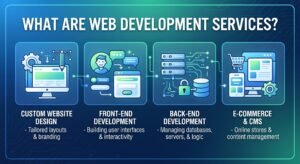
Web development services include the technical work involved in creating, improving, maintaining, and securing websites and web-based applications.
That can mean something as simple as developing a five-page business website. It can also mean building a complex e-commerce platform, customer portal, booking system, SaaS product, or custom business application.
The important point is that web development isn’t one single service.
Different businesses need different solutions.
A local service company may only need a fast website with service pages, contact forms, location information, and a blog.
An online retailer needs something very different. It may need product management, categories, shopping carts, payment integration, customer accounts, inventory features, order management, and secure checkout.
A software company may need a custom web application rather than a traditional marketing website.
This is why a professional developer starts by understanding the business before deciding what technology to use.
People often use these terms interchangeably, but they aren’t exactly the same.
Web design focuses heavily on how a website looks and how users interact with it.
This includes:
Web development turns those designs into a working website.
It handles things such as functionality, databases, forms, APIs, content management systems, authentication, integrations, performance, and other technical requirements.
The two areas work together.
A beautiful website with poor development can be frustrating to use. A technically strong website with confusing design can also lose customers.
The best results come when design and development are planned together.
The internet has changed how customers research businesses.
Someone looking for a service may discover a company through Google, social media, an advertisement, a recommendation, or a direct search for the brand.
In almost every case, the website becomes an important part of the decision.
Customers want answers quickly.
They want to know:
What does the business offer?
Can I trust it?
How much does it cost?
Where is it located?
How can I contact it?
Does it look professional?
A properly developed website can answer these questions without making the visitor work for the information.
A physical office closes.
Your website doesn’t have to.
A customer can visit your website at midnight, read your services, view your portfolio, submit a form, or purchase a product.
That gives even a small business a digital presence that can continue working outside normal office hours.
Think about two companies offering the same service.
Company A has a modern website with clear services, real information, professional images, customer reviews, and easy contact options.
Company B has an outdated website with broken links, unclear information, and a layout that barely works on a phone.
Even if both companies provide excellent services, many customers will naturally feel more confident about Company A.
A website doesn’t automatically prove that a business is good.
But a professional online experience can reduce doubt.
A website should not simply provide information.
It should guide visitors toward the next step.
That could be:
Call Now
Request a Quote
Book a Consultation
Send a WhatsApp Message
Buy Now
Start a Free Trial
The right call-to-action depends on the business model.
This is where development, design, content, and marketing start working together.
A website can support business growth in several ways.
First, it gives potential customers a place to understand your offer.
Second, it creates a destination for Google search traffic.
Third, it gives advertising campaigns somewhere to send visitors.
Fourth, it can collect leads.
Fifth, it can sell products or services directly.
But there is another important benefit.
Social media platforms are useful, but you don’t completely control their algorithms, layouts, or reach.
Your website gives you a digital property that belongs to your business.
You control the content, structure, branding, customer journey, and technical setup.
That doesn’t mean social media is unnecessary.
It means your website can act as the central hub.
Social media brings attention.
Search brings discovery.
Advertising brings targeted visitors.
Your website helps turn those visitors into customers.
There isn’t one perfect website for every business.
The right development service depends on what you want the website to accomplish.
Here are some of the most common options.
| Website Type | Best For | Common Features |
|---|---|---|
| Business Website | Local and service businesses | Services, About, Contact, Blog |
| Corporate Website | Established companies | Multiple departments, services, resources |
| E-commerce Website | Online stores | Products, cart, checkout, payments |
| WordPress Website | SMEs, publishers, service businesses | CMS, pages, blog, plugins |
| Custom Web Application | Complex businesses | Dashboards, accounts, databases |
| Landing Page | Campaigns and lead generation | Offer, benefits, CTA, form |
| Portfolio Website | Professionals and agencies | Projects, services, contact |
| Booking Website | Appointments and services | Calendar, booking, notifications |
Choosing the wrong type can create problems later.
For example, a company that expects to sell hundreds of products shouldn’t build a simple brochure website and hope to turn it into a full e-commerce platform later without planning.
Similarly, a small local business doesn’t necessarily need an expensive custom application.
Good development starts with the actual business requirement.
A business website is designed to explain what a company does and help potential customers take action.
A typical business website may include:
The exact structure depends on the company.
A local plumber, software company, solar installer, law firm, restaurant, and marketing agency will all need different content.
The development should therefore reflect the customer’s journey rather than simply copying a standard template.
For example, a service business may need a prominent quotation form.
A restaurant may need menus, location information, reservations, and opening hours.
A software company may need product pages, documentation, pricing, and demo requests.
The website should support the way customers actually buy.
An e-commerce website is more complex because it doesn’t just present information.
It handles transactions.
A professional online store may need:
Security becomes particularly important here.
Customers are trusting the website with personal information and, depending on the payment setup, financial details.
A poorly built store can create a bad experience even when the products themselves are excellent.
That is why e-commerce development should consider the complete customer journey from product discovery to completed order.
Sometimes a normal website isn’t enough.
A business may need software that runs inside a browser.
Examples include:
Customer dashboards
Employee management systems
Booking platforms
Learning management systems
CRM platforms
Inventory systems
SaaS applications
Business reporting dashboards
These projects require deeper development because the application may use databases, user accounts, permissions, APIs, automation, and complex business rules.
The cost can therefore be significantly higher than a basic business website.
Current Pakistan pricing guides also show a wide difference between ordinary business websites and custom web applications because functionality and project scope can change dramatically.
WordPress remains a practical option for many businesses.
It can be used for company websites, blogs, news websites, portfolios, service businesses, and many online stores.
One major advantage is content management.
A properly configured WordPress website allows business owners or their teams to update pages and publish content without editing the underlying code every time.
But WordPress quality depends heavily on how it is built.
Installing dozens of unnecessary plugins isn’t a development strategy.
A professional WordPress project should consider:
Theme quality
Plugin selection
Security
Performance
Mobile usability
SEO structure
Backups
Updates
Hosting
A poorly configured WordPress website can become slow and difficult to maintain.
A carefully developed one can be fast, flexible, and easy to manage.
You may have heard developers talk about front-end, back-end, and full-stack development.
These terms describe different parts of a web project.
The front end is what users see and interact with.
It includes the website’s interface, buttons, menus, forms, animations, page layouts, and responsive behavior.
Common technologies include HTML, CSS, and JavaScript, along with modern frameworks and libraries.
The goal is simple:
Make the website work properly for the person using it.
The back end handles the functionality behind the scenes.
It may manage:
Users may never see the back end directly, but they depend on it every time they submit a form, log in, place an order, or retrieve information.
A full-stack developer can work across both front-end and back-end systems.
This can be especially useful for projects where the interface and underlying functionality need to be developed closely together.
However, “full-stack” doesn’t automatically mean “best.”
The important thing is whether the development team has the right skills for your particular project.
A website can look fantastic on a desktop and still fail on a phone.
That’s a serious problem.
People increasingly browse websites from mobile devices, and mobile visitors expect pages to be readable, responsive, and easy to use.
Google’s own guidance emphasizes mobile usability as part of creating a strong page experience.
Mobile-first development means designing the experience around smaller screens first, then expanding it for larger devices.
This affects much more than screen width.
Buttons need to be easy to tap.
Menus need to be simple.
Text needs to remain readable.
Images need to load efficiently.
Forms need to be easy to complete.
A visitor shouldn’t have to zoom into a tiny button just to contact your business.
Imagine someone searches for your service from their phone.
They click your result.
The page takes too long to load.
The text is tiny.
The menu is difficult to use.
The contact button is almost impossible to tap.
What happens?
They leave.
You may never know that visitor existed.
That’s why mobile development isn’t merely a technical checkbox. It can directly influence the customer’s decision.
Nobody enjoys waiting for a website.
Performance has become both a user-experience concern and an important part of modern web development.
Google recommends paying attention to Core Web Vitals and overall page experience, while also making clear that strong scores alone don’t guarantee top rankings.
A fast website can make it easier for visitors to browse pages, read information, complete forms, and move toward a purchase.
Performance can be affected by many things.
Large images are one common problem.
Unnecessary scripts can also slow pages down.
Poor hosting, excessive plugins, inefficient code, third-party tools, and badly configured caching can all contribute.
This point is important.
Some businesses focus on speed only because they want a better SEO score.
That’s too narrow.
The real goal is to give people a better experience.
If a visitor can open your service page quickly, understand the offer, and contact you without waiting, your website is doing its job.
SEO shouldn’t be added at the very end of development.
It should influence the website structure from the beginning.
An SEO-friendly website should make it easy for search engines and users to understand the content.
That includes things such as:
But technical SEO isn’t enough.
A perfectly coded website with weak content won’t magically rank for competitive searches.
The website needs useful information that genuinely satisfies the visitor.
That’s why web development and SEO should work together rather than being treated as completely separate services.
SEO often gets described as keywords, backlinks, and rankings.
There is much more to it.
Imagine you’re trying to rank a service page for a competitive keyword.
The page needs useful content.
But it also needs a structure that users can navigate.
The URL should make sense.
The page should load properly.
Search engines need to be able to access it.
Important pages shouldn’t accidentally be blocked.
Internal links should help users discover related information.
The site should work properly on mobile devices.
This is where development becomes part of the SEO foundation.
Think of SEO content as the material inside a building.
Web development creates much of the structure around it.
If the structure is weak, even excellent content can struggle to perform well.
That’s why businesses investing seriously in organic search should consider SEO requirements before development is finished.
A website can have excellent technology and still fail if people don’t know how to use it.
That’s where UI/UX design becomes important.
UI means User Interface. It covers the visual elements people interact with, such as buttons, menus, forms, cards, typography, and page layouts.
UX means User Experience. It focuses on how easy and logical the entire website feels.
A good user experience answers an important question:
Can your visitor find what they need without getting confused?
Imagine visiting a website because you want a service quote. You find the service page, but there is no obvious way to contact the company.
That’s a UX problem.
Now imagine the contact button is visible, but the form asks for 15 unnecessary details.
That’s also a UX problem.
Professional web development should therefore consider the user’s journey from the first click to the final action.
Design isn’t only about making a website beautiful.
It should help visitors understand information.
Clear headings create hierarchy. White space makes pages easier to scan. Consistent buttons make navigation predictable. Good typography improves readability.
These small decisions can make a website feel much more professional.
A complicated website creates friction.
Every unnecessary step gives a visitor another reason to leave.
For a business website, the goal should be simple. Help the visitor understand the offer and make the next step obvious.
That next step could be a call, quote request, booking, purchase, or contact form.
Responsive development allows a website to adapt to different screen sizes.
A visitor might open your website on:
The website shouldn’t require a completely different experience for every device.
Responsive layouts can adjust elements such as columns, images, navigation, spacing, and text according to the available screen size.
A responsive website should keep important content accessible.
Menus should work properly.
Images shouldn’t overflow the screen.
Buttons should remain easy to tap.
Text shouldn’t become too small.
Forms should remain usable.
Users shouldn’t need to pinch and zoom just to read your service information.
Google also recommends making pages work well across devices as part of providing a strong overall page experience.
Security is easy to ignore until something goes wrong.
A website can contain valuable business information, customer details, login credentials, orders, forms, and other data.
Security should therefore be considered during development rather than treated as an optional extra.
A professional development process can include measures such as HTTPS, secure authentication, access controls, input validation, secure dependencies, regular updates, backups, and appropriate server configuration.
The exact security requirements depend on the project.
An online store, for example, has different risks from a simple five-page company website.
People are more comfortable interacting with websites that look trustworthy.
A secure connection alone doesn’t make a website completely secure, but it is an essential baseline.
If a website contains broken pages, strange redirects, outdated software, or suspicious forms, visitors may immediately lose confidence.
Security is therefore both a technical concern and a business concern.
AI is changing the way developers work.
Modern development teams can use AI-assisted tools for tasks such as code generation, debugging, documentation, testing assistance, research, and repetitive development work.
But there’s an important difference between using AI as a development assistant and allowing AI to build an entire production website without proper human review.
AI-generated code can contain mistakes.
It may introduce unnecessary complexity.
It may also create security or performance issues if nobody reviews the output properly.
The strongest approach is often human-led development with AI used where it genuinely improves productivity.
Developers can use AI to generate a starting point for repetitive tasks.
They can then review, modify, test, and integrate the result into the actual project.
This can save time without removing professional oversight.
A website isn’t successful because its code was generated quickly.
It succeeds when the technology supports a real business goal.
You still need to understand the customer.
You still need useful content.
You still need good UX.
You still need SEO.
And you still need a clear conversion path.
AI can assist with development. It can’t replace the need to understand why the website exists.
There is no single technology that is best for every website.
The right stack depends on the project’s requirements, budget, scalability needs, development team, and long-term maintenance plan.
Some technologies and platforms commonly used across modern web development include JavaScript, TypeScript, React, Next.js, Node.js, PHP, Laravel, WordPress, APIs, and headless architectures.
React is widely used for building interactive user interfaces.
It can be useful for applications where users interact with dynamic components and data.
For example, dashboards, web applications, and complex interfaces can benefit from component-based development.
Next.js is a React-based framework that supports modern approaches to building web applications.
It can be useful when developers need features such as server-side rendering, static generation, routing, and full-stack capabilities.
However, using a popular framework doesn’t automatically make a website better.
The framework still needs to be implemented correctly.
JavaScript remains a core technology for interactive websites.
TypeScript adds static typing to JavaScript, which can help developers manage larger codebases and catch certain errors earlier.
PHP continues to power a huge number of websites.
Laravel provides a modern development framework for building PHP applications.
It can be useful for custom business applications, APIs, dashboards, and other projects that need structured backend development.
WordPress remains a popular content management system for businesses and publishers.
It’s particularly useful when a client needs to manage content regularly without depending on a developer for every small update.
Modern websites often need to communicate with other systems.
An API can connect a website with services such as payment platforms, CRMs, inventory systems, analytics tools, booking systems, or mobile applications.
Headless architecture separates the content or backend from the front-end presentation layer.
This can provide flexibility, but it also adds complexity.
Again, the best technology is the one that solves the actual problem.
This is one of the first questions many business owners ask.
The honest answer is:
It depends on what you’re building.
A basic business website and a custom web application aren’t comparable projects.
Their development time, functionality, testing, security requirements, and maintenance needs can be completely different.
Published Pakistan-focused 2026 pricing guides show wide ranges across business websites, e-commerce projects, and custom applications. The exact price depends heavily on scope and features.
| Factor | Why It Can Increase Cost |
|---|---|
| Number of Pages | More pages require more planning and development |
| Custom Design | Unique interfaces require additional design work |
| E-commerce | Products, checkout, payments, and orders add complexity |
| Custom Features | Special functionality needs additional development |
| Integrations | APIs and third-party systems require technical work |
| SEO Setup | Technical SEO and content structure need planning |
| Security | More complex websites need stronger security controls |
| Performance | Optimization can require additional development |
| Maintenance | Updates, monitoring, and support create ongoing costs |
A simple company website may contain several informational pages, contact forms, service information, and a blog.
This type of project is usually much simpler than an e-commerce store or custom application.
An online store requires additional functionality.
Products need to be managed.
Customers need a checkout process.
Orders need to be recorded.
Payments need to be handled.
Shipping may need integration.
All these requirements increase development complexity.
Custom applications can vary enormously.
A small internal dashboard may be relatively straightforward.
A complete SaaS platform with accounts, subscriptions, databases, APIs, reporting, and administrative systems is a much larger project.
That’s why reputable developers usually ask about requirements before providing a final quotation.
Templates can be useful.
They’re often faster to launch and may cost less.
But they also come with limitations.
A template usually starts with a predefined structure. Developers can customize it, but the underlying design may still influence the final website.
Custom development starts from the business requirements.
The design, functionality, architecture, and user journey can be created around the specific project.
| Feature | Template-Based Website | Custom Website |
|---|---|---|
| Initial Setup | Usually faster | Usually takes longer |
| Customization | Limited to platform/theme | Much more flexible |
| Unique Design | Moderate | High |
| Complex Features | Can be limited | More flexible |
| Scalability | Depends on platform | Can be planned around needs |
| Cost | Often lower initially | Usually higher |
| Development Time | Shorter | Longer |
No.
That’s an important point.
A small business may not need a completely custom platform.
If a WordPress website can deliver everything the business needs, building a custom system could waste money.
Custom development makes more sense when the business has requirements that standard themes, plugins, or platforms can’t handle efficiently.
The right solution isn’t the most expensive solution.
It’s the solution that fits the business.
Choosing a development company is a business decision.
Don’t choose one only because it offers the cheapest quotation.
Start by checking its portfolio.
Look for projects that are similar to your business or technical requirements.
Then examine the websites carefully.
Are they mobile-friendly?
Do the pages load properly?
Is the navigation clear?
Do the websites look professional?
Can you understand what each company does within a few seconds?
These details can tell you a lot about the development team’s approach.
Ask what technologies they use and, more importantly, why they recommend them.
A professional developer should be able to explain the reasoning in simple language.
You shouldn’t need a computer science degree to understand why a particular solution is being proposed.
If organic traffic matters to your business, discuss SEO before development begins.
Ask whether the website will have:
SEO shouldn’t be treated as an afterthought.
Websites need ongoing attention.
Software changes.
Dependencies get updated.
Security issues appear.
Business information changes.
New content needs to be published.
Before signing a project, ask who will handle maintenance after launch.
Before choosing a developer, look beyond the sales pitch.
A reliable development partner should be able to explain the project clearly.
Consider these areas:
| What to Check | Why It Matters |
|---|---|
| Portfolio | Shows practical experience |
| Reviews | Provides insight into past client experiences |
| Communication | Keeps the project moving |
| Technology | Determines technical capabilities |
| SEO Knowledge | Helps create search-friendly foundations |
| Security | Protects the website and users |
| Performance | Supports better user experience |
| Support | Helps after launch |
| Pricing | Keeps project expectations clear |
| Timeline | Helps with planning |
A developer can be technically brilliant but difficult to work with.
If communication is poor during the sales stage, the project may become even harder once development begins.
You should know who is responsible for communication, how updates are provided, and how changes are handled.
Clear communication prevents many unnecessary problems.
Professional development usually follows a structured process.
The exact process can vary, but the following stages provide a useful framework.
The first step is understanding the business.
What does the company do?
Who are its customers?
What should the website achieve?
What features are required?
What platforms or integrations are needed?
Without clear answers, development can quickly become messy.
The team determines the main pages and how they connect.
This is sometimes called information architecture.
A well-planned structure helps both users and search engines understand the website.
The design stage defines how the website will look and behave.
This includes layouts, navigation, typography, buttons, forms, and responsive behavior.
The approved design is converted into a functioning website.
Front-end and back-end systems are developed according to the project requirements.
Text, images, videos, products, service information, and other content are added.
This is also where SEO-friendly page structures can be implemented.
Testing shouldn’t be skipped.
Developers may test:
Forms
Links
Navigation
Mobile layouts
Browser compatibility
Performance
Security
E-commerce functionality
The exact tests depend on the website.
Before launch, important technical elements should be reviewed.
Pages need to be accessible.
URLs should be correct.
Important pages should be indexable.
Metadata should be properly configured.
Images should be handled efficiently.
The website should also be checked for mobile and performance issues.
Once testing is complete, the website can be moved to its production environment.
But launch isn’t the end.
It’s the beginning of the website’s real life.
After launch, businesses may need updates, security checks, backups, performance monitoring, content changes, and new features.
A website should evolve as the business grows.
Imagine launching a website today and doubling your customer base next year.
Your website should be able to handle that growth.
Scalability means planning the website so it can support future requirements without requiring a complete rebuild every few months.
That doesn’t mean you need to over-engineer everything from day one.
It means making sensible decisions.
For example, an online store might eventually need more products, payment methods, shipping options, customer accounts, and integrations.
Planning for those possibilities can make future development easier.
A scalable website grows with the business instead of becoming a technical roadblock.
A website doesn’t generate sales simply because it exists.
It needs to support the customer’s decision-making process.
Imagine a potential client lands on your service page.
They should quickly understand:
What you offer.
Who it’s for.
Why it matters.
Why they should trust you.
What they should do next.
That final step is important.
A strong CTA can guide the visitor toward an action.
For example:
Get a Free Quote
Book a Consultation
Contact Our Team
Request a Demo
Start Your Project
The CTA should match the visitor’s intent.
Someone reading an educational blog post may not be ready to “Buy Now.”
They may be ready to learn more.
Someone viewing a pricing page may be much closer to making contact.
Good website development supports these different stages instead of treating every visitor the same way.
Choosing a web development partner is about more than getting a website online.
You need a website that supports your actual business goals.
XpertCodes provides web development services designed around business requirements, user experience, responsive functionality, and modern website needs.
Whether you need a business website, e-commerce platform, custom functionality, or a stronger online presence, the project should begin with understanding what you want to achieve.
The development process should then connect the design, functionality, performance, SEO foundation, and customer journey.
XpertCodes also works across related digital services, including UI/UX Design and SEO Optimization. This can be useful for businesses that want their website and digital marketing strategy to work together instead of treating them as completely separate projects.
A website shouldn’t simply look professional.
It should help your business communicate, attract visitors, generate leads, and create opportunities.
Every business has different requirements.
XpertCodes can approach web projects according to those requirements rather than forcing every client into exactly the same website structure.
A professional business website can showcase your company, services, team, portfolio, contact information, and expertise.
It’s a strong option for companies that primarily want to generate awareness and leads.
If you want to sell products online, an e-commerce website can provide the foundation for product discovery, checkout, order management, and customer interaction.
The development approach should depend on the number of products, payment requirements, shipping model, and other business needs.
Some businesses need more than pages.
They need functionality.
Custom web applications can be designed around specific workflows, dashboards, databases, customer accounts, and other requirements.
Every modern business website should provide a good experience across screen sizes.
Responsive development helps ensure visitors can access the website comfortably from phones, tablets, laptops, and desktops.
A website should provide a strong technical foundation for future SEO work.
That means considering site structure, performance, mobile usability, URLs, internal linking, crawlability, and content organization during development.
Web development services cover the creation, functionality, testing, optimization, security, and maintenance of websites and web applications.
There isn’t one universal price. Cost depends on the website type, number of pages, design requirements, features, integrations, e-commerce functionality, technology, and ongoing support.
A simple business website may take considerably less time than an e-commerce store or custom web application. The timeline depends on project scope, content readiness, revisions, integrations, and testing.
Web design focuses mainly on the visual interface and user experience. Web development turns that design into a functioning website and handles technical functionality.
Yes. WordPress can be a practical choice for many businesses, especially when regular content management is important. Its success depends on proper configuration, theme and plugin choices, security, performance, and maintenance.
Not always. Custom development is useful when a business needs unique functionality or complex workflows. WordPress may be more practical for businesses whose requirements fit the platform.
Yes. Website structure, performance, mobile usability, crawlability, technical configuration, and other development decisions can affect the foundation on which SEO operates.
Many visitors access websites from mobile devices. A mobile-friendly website makes content, navigation, forms, and important actions easier to use on smaller screens.
There is no single best technology. The right choice depends on the project’s requirements, budget, scalability needs, content management needs, integrations, and long-term maintenance.
Check the company’s portfolio, technical skills, communication process, SEO understanding, security practices, pricing, timelines, maintenance options, and previous client experience.
Yes, when the website is built around a clear business purpose.
Your website can become one of your most valuable digital assets.
It can introduce your company to new customers, support SEO, generate leads, sell products, explain complex services, and provide customers with information around the clock.
But getting those results requires more than an attractive homepage.
You need the right technology.
You need responsive design.
You need good UX.
You need strong performance.
You need security.
You need useful content.
You need an SEO-friendly foundation.
Most importantly, you need a website that makes sense for your business.
The cheapest option isn’t always the best option.
The most complicated option isn’t either.
The right web development solution is the one that solves today’s problems while leaving enough room for tomorrow’s growth.
If you’re planning a new website or want to improve an existing one, XpertCodes can help you turn your business requirements into a professional digital experience.
Choosing the right web development company can make a big difference to your online business. You don’t just need a website that looks good. You need a website that is fast, responsive, easy to use, secure, and built around your business goals.
XpertCodes focuses on creating professional digital solutions for businesses that want to build or improve their online presence.
Every business has different goals. XpertCodes focuses on understanding your requirements before deciding how the website should be built. Whether you need a company website, e-commerce store, landing page, or custom web solution, the development approach should match your actual needs.
Your customers may visit your website from a phone, tablet, laptop, or desktop. XpertCodes focuses on responsive development so your website can provide a consistent experience across different screen sizes.
A website should be built with future growth in mind. Clean structure, mobile usability, page performance, logical navigation, and search-friendly architecture can provide a stronger foundation for SEO.
XpertCodes also offers SEO Optimization, allowing businesses to work on their website development and search visibility as connected parts of their digital strategy.
A website needs both good design and solid development.
A beautiful interface isn’t enough if the website is difficult to use. Similarly, strong development won’t help much if visitors struggle to understand the interface.
XpertCodes also provides UI/UX Design, helping businesses create a more consistent connection between visual design, user experience, and website functionality.
A slow website can frustrate visitors and make it harder for them to reach important pages.
Performance should therefore be considered during development. Efficient code, optimized assets, responsive layouts, and sensible technical choices can help create a smoother browsing experience.
Your business may change after the website launches.
You may add new services, products, pages, features, or integrations. A good website should leave room for future improvements instead of becoming a limitation.
XpertCodes approaches web development with the goal of creating solutions that can support changing business requirements.
A successful project requires communication between the client and development team.
From understanding requirements to reviewing progress and making improvements, clear communication helps keep expectations realistic and the project organized.
Web development is only one part of building a strong online presence.
Your website also needs good design, useful content, SEO, and a clear customer journey.
With services covering Web Development, UI/UX Design, and SEO Optimization, XpertCodes can support different parts of that digital journey.
If you’re planning a new website or want to improve an existing one, XpertCodes can help you explore the right solution for your business.
[ Explore Web Development Services ]
Explore professional web development services in 2026. Learn about website types, costs, SEO, mobile development, security, and how a better website can grow your business.
| Resource | What You Can Learn |
|---|---|
| Google Search Central | Learn how Google Search works and how to build search-friendly websites. |
| Core Web Vitals | Understand important website performance and user experience metrics. |
| MDN Web Docs | Explore trusted web development documentation, tutorials, and technical guides. |
| W3C Web Accessibility Initiative | Learn about accessibility standards and how to make websites easier to use. |
| OWASP | Learn about common web security risks and security best practices. |
| React | Explore documentation for building modern interactive user interfaces. |
| Next.js | Learn about modern React-based web application development. |
| WordPress Documentation | Find official guides for building and managing WordPress websites. |