Close
Xpertcodes – Where Expertise Meets Innovation | Code | Consult | Expert
Your website can publish useful content and still struggle to attract visitors from Google. Sometimes, your pages rank for the wrong keywords. Other times, they appear in search results but receive very few clicks. Without reliable data, it is hard to know what needs to change.
A keyword rank tracker helps you monitor keyword positions and understand how your website performs in Google Search. It shows how selected keywords move over time. When you combine this information with traffic and engagement data, you can make better SEO decisions.
This guide explains how to monitor Google rankings, how to track several keywords, and how to understand ranking changes. You will also learn how to use Google Search Console, choose a tracking tool, and improve your SEO strategy. Whether you run a small business, manage a blog, or work with clients, these methods can help you measure progress and find new opportunities.
A keyword rank tracker is a tool that checks where a website appears for selected search terms. For example, you might want to know whether your page ranks for “best project management software” or “plumber in Austin.” The tool checks the Google search results for those terms and records the keyword position it finds. This creates a record you can review over time. Instead of relying on memory or occasional searches, you can use consistent ranking data to understand changes in your website’s visibility.
A rank tracker matters because rankings can affect how easily people discover your website. However, a higher position does not always lead to more visits or sales. Search intent, competition, titles, and the search results layout also influence performance. A useful keyword rank tracker helps you see which terms are improving, which pages need attention, and where new opportunities may exist. For better decisions, combine ranking information with clicks, impressions, conversions, and other measures of organic search performance.
Most rank trackers start with a list of keywords and the website you want to monitor. You choose relevant settings, such as the search engine, country, city, and device, when the tool supports them. The tool then checks the search engine results page (SERP) for each term and records the position of your selected website or page. Some tools also save historical results, group keywords, and create reports. These features make keyword monitoring easier, especially when you need to check many terms regularly.
Your reported position can change because Google results are not identical for every search. Location, device, search context, and the tool’s checking method can affect the results. A position recorded for a desktop search in New York may differ from a mobile search in Los Angeles. That is why reliable tracking requires consistent settings. When you monitor keyword ranking changes, compare results from the same locations and device types whenever possible. This makes your ranking history more useful and reduces the risk of drawing conclusions from unrelated results.
Google keyword rankings help you understand whether your pages appear for searches that matter to your business. If a service page gains visibility for a relevant commercial term, more potential customers may discover it. If an important page loses positions, you have a reason to investigate. Rankings also help you compare related pages and identify topics where your website needs stronger content. Still, ranking position is only one part of SEO. You should also measure search visibility, qualified visits, leads, and sales.
Imagine that a US software company targets the phrase “inventory management software for small businesses.” Its page moves from position 18 to position 9. This change may improve its chance of attracting attention, but the business should also check impressions, clicks, and conversions. If traffic rises but leads remain unchanged, the page may attract the wrong audience or fail to meet visitors’ needs. A strong tracking process connects keyword positions with business outcomes. That helps you decide whether to improve the content, adjust the page, or target a more suitable search term.
Learning how to track keyword rankings starts with a clear process. First, decide which searches matter to your website. Next, record your current performance and choose a reliable way to check positions. Then review changes over time and connect them with traffic and conversions. You do not need to track every keyword on the internet. A smaller, relevant list often provides more useful insights than a huge list with no clear purpose.
For a simple starting point, use Google Search Console to understand how people find your website. You can then use a dedicated Google ranking tracker for websites if you need more controlled checks for selected keywords, locations, or devices. Keep your tracking settings consistent and review the same groups of terms each time. This process helps you track website rankings on Google without confusing normal search variation with meaningful progress. It also gives you a clear baseline for future SEO improvements.
Start with keywords that match your products, services, audience, and business goals. A local accountant might track “small business accountant in Denver,” while an online store might focus on product categories and buying-related searches. Include a mix of informational and commercial terms when both matter to your strategy. Use keyword research to discover how people describe their problems, what they want to buy, and which questions they ask before making a decision. Choose terms that reflect real customer needs rather than adding keywords simply because they sound popular.
Next, check which keywords already bring impressions or clicks to your website. Google Search Console can reveal queries where your pages appear but receive limited traffic. You can also review competitor pages, customer questions, and relevant search suggestions to find missing topics. Assign each important keyword to a suitable page whenever possible. This reduces confusion and helps you measure the right URL. A keyword rank tracker for small businesses should make this process manageable, not create extra work by encouraging you to follow hundreds of low-value terms.
If you want to learn how to check keyword position in Google, start by searching for your target phrase and examining the results. However, a manual search is only a quick observation. Your location, device, search history, and changing results may affect what you see. Use a consistent tracking tool when you need repeatable measurements. Record the keyword, target page, date, country or city, device, and reported position. These details help you understand what the number represents and make later comparisons more reliable.
You can also use a free Google keyword rank checker to begin tracking a small number of terms, provided it clearly explains its limits. Check whether it supports your target country and whether it records historical positions. Do not assume that every free tool measures rankings in the same way. If you use Google Search Console, remember that its average position represents aggregated search performance rather than one fixed result for every searcher. For a deeper explanation, read Google’s official Performance Report documentation.
A single ranking check cannot tell you whether your SEO strategy is working. You need repeated measurements and a consistent comparison period. Save the starting position, check it again on your chosen schedule, and look for patterns across several weeks. If a page moves from position 20 to position 12, record the change and review its impressions and clicks. Avoid making a major content change because of one unusual reading. The goal is to monitor keyword ranking changes and understand whether they represent a sustained trend.
Keep notes about important website changes. These might include publishing a new article, improving internal links, fixing indexing problems, or updating a service page. If rankings change after an update, these notes can help you investigate possible causes. They do not prove that the change caused the movement, but they give you useful context. Review your ranking history alongside traffic and conversions. This helps you see whether improved positions are reaching the right audience and contributing to your website’s goals.
A useful keyword rank tracker should help you understand more than position alone. You need to know whether people see your pages, click your results, and take useful actions after visiting. Important measurements include keyword position, impressions, clicks, click-through rate, and organic traffic. Each metric answers a different question. Together, they help you understand SEO performance tracking and identify areas that deserve closer attention.
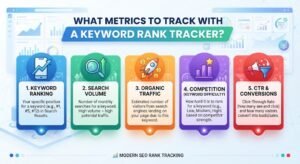
Do not treat every metric as proof of success on its own. A page can gain impressions without gaining clicks. It can also attract more visitors without generating more leads. Review the numbers together and compare similar periods. A clear keyword performance report can help you spot patterns, explain changes, and choose your next steps. The aim is not to collect the most data. It is to collect information that helps you make better decisions.
Keyword position tells you where a tracked page appears for a search term under the tool’s settings. Ranking history shows how that position changes over time. For example, a keyword may move from position 25 to position 16 and then to position 11. This pattern suggests progress, although it does not guarantee that the page will continue to improve. Review several readings before deciding whether the trend is meaningful. Also check whether the intended page appears for the query and whether the keyword matches the page’s purpose.
Google Search Console reports impressions, clicks, and click-through rate (CTR). An impression means your result appeared in a Google Search context counted by the report. A click means someone selected your result. CTR is the percentage of impressions that resulted in clicks. For example, 100 clicks from 2,000 impressions produce a 5% CTR. If impressions rise but clicks remain flat, review the queries, title, description, position, and search results layout. You can learn more from Google’s official Search Console Performance Report guide.
Search visibility describes how present your website is across a selected group of search terms. Different tools calculate visibility in different ways, so check the provider’s method before comparing scores. Organic traffic measures visits that arrive through unpaid search results. These measurements answer different questions. Visibility helps you understand your presence in search, while traffic shows whether people are visiting your site. When possible, connect both with leads, purchases, sign-ups, or other conversions. This gives you a clearer view of the business value of your SEO work.
| Metric | Main question | What to review next |
|---|---|---|
| Keyword position | Where does the page appear? | Ranking trend and search intent |
| Impressions | How often does the result appear? | Queries and search demand |
| Clicks | How many visits came from search? | Landing page and traffic quality |
| CTR | How often do impressions lead to clicks? | Title, snippet, and SERP layout |
| Organic traffic | How many visits came from unpaid search? | Engagement and conversions |
| Conversions | Did visitors take useful actions? | Page experience and offer relevance |
When your website targets many search terms, checking them one by one becomes difficult. You need a system that keeps related keywords together and connects each term with the right page. This is how to track multiple keywords without losing sight of your main goals. Organize terms by topic, intent, page type, and business value. A clear structure also makes it easier to spot missing content and pages that compete for similar searches.
A keyword tracking dashboard can bring positions, trends, and selected performance metrics into one place. Its value depends on how well it supports your workflow. Avoid building a dashboard full of numbers that nobody uses. Focus on the keywords that matter, the pages you want to improve, and the decisions you need to make. For larger websites, a keyword ranking tool for agencies may also help organize multiple clients, projects, and reports. Check the tool’s actual features before choosing it for this purpose.
Group keywords by the subject and the reason behind each search. For example, someone searching “what is email marketing” probably wants an explanation. Someone searching “best email marketing software” may be comparing products. A person searching “email marketing software pricing” may be closer to making a purchase. These searches are related, but they do not always belong on the same page. Understanding search intent helps you assign each keyword to content that answers the user’s real question. It also makes your tracking reports easier to understand.
Create a clear relationship between each target keyword and its intended page. A product page may target a buying term, while a guide supports related informational searches. Then review whether Google shows the expected page for important queries. If several pages appear for similar searches, investigate their purpose, content, and internal links before making changes. This is a practical way to track website rankings on Google while keeping your site organized. Multiple pages ranking for related terms are not automatically a problem. The key question is whether each page serves a distinct user need.
Businesses that serve specific areas should pay attention to location-based rankings. A dentist in Dallas, for example, may need to track terms related to dental services in Dallas rather than nationwide results. A business with offices in several cities may need separate keyword groups for each location. Use a tool that supports the places and search settings relevant to your customers. If your goal is to track local keyword rankings, remember that a tracked result represents a specific measurement, not a promise that every person in that city will see the same position.
The right schedule depends on your website, competition, and SEO goals. A new page may need closer observation while you establish a baseline. A stable website with many existing pages may benefit more from regular weekly reviews and a deeper monthly analysis. Your goal is to understand meaningful patterns rather than react to every movement. A consistent routine makes SEO performance tracking more useful because you can compare similar periods and connect changes with actions taken on your website.
Choose a schedule you can maintain. Record important changes, such as content updates, website migrations, or technical fixes. Then review rankings alongside impressions, clicks, and conversions. This process can help you distinguish a temporary change from a wider problem. When deciding how often to check keyword rankings, consider the value of the keyword and the risk of missing a major issue. High-priority terms may deserve more frequent checks, but daily monitoring is not necessary for every website or keyword.
Daily rank tracking can be useful when monitoring important commercial keywords, investigating sudden changes, or reviewing a major website launch. However, daily results can move for several reasons that have little to do with a lasting SEO improvement. Weekly rank tracking is often easier for small businesses and content websites to manage. It gives you a regular view of progress without encouraging constant reactions. You can review high-priority keywords more often and reserve broader analysis for monthly reports. Select a schedule that matches your goals and the features your tracking tool provides.
Start by comparing equivalent periods and checking whether several related keywords have moved in the same direction. Then review impressions, clicks, landing pages, and any recent website changes. A small movement in one keyword may not require action. A sustained decline across an important group of pages deserves closer investigation. This approach helps you separate normal ranking fluctuations from patterns that may signal a content, competition, or technical issue. Before making changes, gather enough evidence to form a reasonable explanation and decide what to investigate first.
It is normal for keyword positions to change over time. Google updates its systems, competitors improve their pages, and search results may change to better match what users want. Your website may also experience technical problems or changes in indexing. These factors can affect Google search results in different ways. A ranking change alone does not reveal its cause. You need to examine the affected queries, pages, dates, and technical signals before deciding what happened.
When you investigate why keyword rankings fluctuate, look for patterns rather than assuming the worst. Did several pages decline at once, or did one keyword change? Did impressions fall while positions stayed similar? Did you publish a major update or change your site’s structure? Each clue points toward a different line of investigation. Use Google Search Console and your rank-tracking records to narrow down possible causes. If a page has disappeared from search entirely, check indexing and availability before making broad content changes.
Google uses automated systems to decide which pages appear for different searches. Changes to these systems can affect visibility, but a ranking drop near an update does not prove the update caused it. First, compare the dates and identify which pages and queries changed. Then review whether your content answers the searcher’s question clearly and completely. Google explains its approach in the Search Central ranking systems guide. Use that guidance to understand the wider process rather than chasing every update with rushed changes.
Your rankings depend partly on how your pages compare with other useful results. Competitors may publish better explanations, update outdated information, improve page usability, or earn relevant mentions and links. Review competitor keyword rankings to understand which pages appear for your target searches and what those pages offer. Look for real content gaps, unclear explanations, missing examples, or outdated details. Do not copy a competitor’s text. Instead, create a more useful page that answers the audience’s needs and gives readers a clear reason to trust your information.
Technical problems can stop a useful page from appearing as expected. Examples include accidental noindex directives, incorrect canonical tags, broken redirects, blocked crawling, and pages that return errors. A redesign or website migration can also affect important URLs if the changes are not handled correctly. Check the affected page in Google Search Console and review its indexing status. You can also use Google’s URL Inspection tool documentation to understand how Google sees a URL. Fix confirmed issues before rewriting content that may already be useful.
Tracking only helps when you use the findings to make better decisions. Start by finding pages with clear opportunities, such as important queries with many impressions but few clicks. Then review the page’s purpose, content quality, search intent, and technical health. You may discover that the page needs a clearer title, better examples, stronger internal links, or more complete information. The right response depends on the evidence. The goal is to improve rankings using keyword data rather than make changes based on guesswork.
Make one clear improvement at a time when practical. Record what you changed and review the results over a suitable period. Some changes may show early signs, while others take longer to evaluate. Rankings can also move for reasons outside your control. Combine ranking data with clicks, impressions, and conversions to judge whether your work is helping. If rankings improve but business results do not, review whether the page attracts the right visitors and meets their needs after they arrive.
High impressions with few clicks can reveal an opportunity, but the numbers need context. A query may attract impressions because your page appears for a broad or loosely related search. Start by checking the exact query and the page Google displays. Review the click-through rate (CTR), average position, title, and snippet. Ask whether the page matches what people want to find. Improve the title or content when there is a genuine mismatch, then measure the results. Do not assume that every low CTR means your title is poor.
Useful content answers the question behind a search. A person looking for a definition needs a clear explanation. Someone comparing software needs features, differences, limitations, and pricing details where available. A buyer may need product information and a clear next step. Review the pages that appear for your target query to understand the format and information users expect. Then improve your page with original explanations, relevant examples, current details, and clear wording. Good on-page SEO supports this work, but repeating the keyword more often will not fix content that misses the user’s needs.
Internal links connect related pages and help readers find useful information. They also help search engines discover URLs and understand how pages relate to one another. Link from relevant articles to important service pages, product pages, or in-depth guides using descriptive anchor text. Review headings, page titles, image alt text, and page structure as well. Keep every link useful and natural. For example, this guide can link to SEO Rank Hunter by XpertCodes when discussing keyword monitoring tools. A relevant link should help the reader, not interrupt the explanation.
A dedicated tracker and Google Search Console can support the same SEO strategy, but they answer different questions. Search Console shows how your website performs in Google Search through metrics such as clicks, impressions, CTR, and average position. A dedicated tracker focuses on checking selected keywords under chosen settings, where those features are supported. Understanding keyword rank tracking vs Google Search Console helps you decide whether you need one tool or both. Your choice should depend on your reporting needs, website size, budget, and the level of detail you require.
For many website owners, Search Console is the right place to start because it provides data about their site’s performance in Google Search. A dedicated tracker may become useful when you need a defined keyword list, location-based checks, or a clearer record of specific ranking movements. These tools do not always measure positions in the same way. Treat their numbers as different views of search performance, and avoid comparing them directly without understanding their methods. When combined carefully, they can help you understand visibility and decide which pages deserve attention.
Google Search Console helps you understand which queries show your pages in Google Search and how often people click them. Its Performance report includes clicks, impressions, CTR, and average position, with filters for dimensions such as queries, pages, countries, and devices. These details can reveal pages that already receive attention but need improvement. For example, a page with rising impressions and low clicks may deserve a closer review. Read Google’s Performance Report guide to understand how the metrics work and what their limits mean.
A dedicated tool can help when you want to follow a set of keywords on a regular schedule. Depending on the provider, it may support selected locations, device types, historical positions, competitor comparisons, and scheduled reports. These features can be useful for businesses with many target terms or agencies that report on several websites. Before choosing a tool, check its update frequency, supported search settings, keyword limits, and data retention. You should also confirm whether the reported positions match the markets you serve. A larger dashboard is useful only when its information supports clear decisions.
The best keyword rank tracker for SEO depends on what you need to measure. A local business may need a short list of city-specific terms. An online store may need to track hundreds of product and category keywords. An agency may need reports for several clients. Compare tools based on their tracking methods, supported locations, reporting options, historical data, ease of use, and cost. Do not choose a tool simply because it advertises more features. Select one that helps you answer real questions about your website’s performance.
Before paying for a subscription, test the workflow with a small group of important keywords. Check whether you can find the information you need without spending too much time on setup and reporting. Review the provider’s documentation to understand how often rankings are checked and how the tool handles different locations and devices. If you work with a team, consider whether the reports are clear enough to share with managers or clients. The right tool should make your work easier and help you act on the results.
Look for reliable keyword tracking, clear settings, useful historical records, and reports that are easy to understand. If you serve several markets, check whether the tool supports your target countries and cities. If mobile searches matter to your audience, confirm whether the tool offers separate desktop and mobile rankings. Also review keyword limits, update schedules, export options, and data retention. No tool can guarantee that every reported position will match every user’s search. A good provider explains its methods and gives you enough context to interpret the results.
Historical data helps you understand whether a keyword is improving, declining, or moving within a narrow range. Reporting features can make these patterns easier to share and review. A keyword ranking report template can record the keyword, target URL, tracking location, previous position, current position, change, impressions, clicks, and next action. You can also use SERP analysis to examine which pages appear for important queries and what those pages offer. Competitor information is useful when it reveals gaps or changes worth investigating, not when it encourages you to copy another website.
| Keyword | Target URL | Previous position | Current position | Impressions | Clicks | Next action |
|---|---|---|---|---|---|---|
| Example keyword A | /service-page/ |
18 | 12 | 1,400 | 42 | Review progress |
| Example keyword B | /guide/ |
7 | 9 | 2,100 | 85 | Investigate decline |
| Example keyword C | /product-page/ |
14 | 14 | 900 | 18 | Review search intent |
Illustrative data only. Replace these values with your own verified results before using this as a real report.
Free tools can be enough when you are learning SEO or monitoring a small website. Google Search Console offers valuable performance data without requiring a paid rank-tracking subscription. A free Google keyword rank checker may provide additional position checks, but its keyword limits, update frequency, and location options can vary. Paid tools may offer larger tracking lists, longer history, scheduled reports, or client management. Compare the features you will actually use against the cost. Paying for more data is not worthwhile if you do not have time to review it or act on the findings.
SEO Rank Hunter by XpertCodes is relevant to readers exploring ways to monitor keyword positions and review SEO progress. Before choosing any tracking tool, identify the information you need and compare it with the product’s current features. A tool should help you answer practical questions, such as which terms need attention and whether important pages are improving. You can explore the SEO Rank Hunter page to review its current offering. Confirm available features and limitations before relying on it for a specific workflow.
A tracking tool is most useful when you connect its data with a clear plan. Record your priority keywords, review changes, investigate meaningful movements, and choose improvements based on evidence. For a broader introduction, read What Is SEO Rank Hunter?. These related resources can help readers understand the product and decide whether it fits their needs. Remember that no rank tracker can promise a specific Google position. Results depend on many factors, including competition, relevance, site quality, and changes in search.
Start by identifying the keywords you want to monitor and the pages you expect to rank for them. Review the product’s current documentation to confirm how it records positions, whether it stores historical data, and which search settings it supports. If SEO Rank Hunter provides the features you need, use a consistent keyword list and review changes over time. Compare those results with available Search Console data to understand clicks and impressions. This approach makes ranking checks part of a larger process rather than an isolated activity.
Ranking information can show where a page may be gaining or losing visibility, but it cannot explain every change on its own. Compare positions with impressions, clicks, traffic, and conversions when these metrics are available. If an important term declines, check the target page, search intent, competing results, and technical health. If a term improves, see whether the page also attracts relevant visitors. This wider view makes SEO performance tracking more useful and helps you avoid treating a ranking increase as proof of business success.
Turn each meaningful finding into a clear next step. A page with many impressions and few clicks may need a better title or closer alignment with the searcher’s needs. A group of declining pages may need a technical review or content assessment. A page that ranks for an unexpected term may reveal an opportunity for useful new content. Record the action you take and review the results later. This process helps you make steady improvements instead of changing several parts of your website without understanding which changes matter.
Rank tracking can lead to poor decisions when you ignore context. One keyword may move several positions while the website’s overall performance remains stable. Another keyword may hold its position while clicks fall. These changes require different responses. Always compare similar date ranges and review related metrics before drawing conclusions. Avoid making major SEO changes because of one unusual reading. A consistent process helps you identify real problems and use your time on improvements that matter.
You should also avoid tracking keywords that have little value to your audience. A large keyword list does not automatically create a better SEO strategy. Focus on searches that match your services, products, and content goals. Keep records of major changes and review their results over time. Use search visibility tracking alongside traffic and conversions where possible. This gives you a more complete picture of performance and helps you avoid decisions based on a single number.
Checking a keyword today tells you only what the tracking method reported at that moment. It does not show whether your website has improved over the past month or declined over the past year. Compare consistent periods and consider seasonal changes where relevant. Review groups of related keywords and their target pages. A clear keyword performance report should show the period covered, the tracking settings, and the changes worth investigating. This makes your findings easier to understand and helps you explain them to clients or team members.
A ranking result has limited value if you do not know where and how it was measured. A business targeting customers in Boston may not benefit from a ranking recorded in another city. Similarly, a page that ranks for an informational query may not attract visitors who are ready to buy. Set the correct location and device where your tool supports them. Then review whether the page matches the searcher’s needs. Consistent settings and clear intent help you interpret location-based rankings more accurately.
Avoid rewriting a page every time its position changes. Short-term movements can occur without a lasting problem, and frequent edits make it harder to understand which changes helped. First, check whether the movement continues and whether related keywords or pages show the same pattern. Investigate technical errors immediately when you find evidence of a serious issue. Otherwise, collect enough information to make a sensible decision. A measured approach protects useful content and keeps your SEO work focused on meaningful improvements.
Choosing a tracking method becomes easier when you understand what the tools can and cannot tell you. The following answers cover common questions about Google rankings, free tools, tracking accuracy, and the time needed to improve performance. Use them as a starting point for building a process that fits your website. Your ideal setup depends on your goals, resources, and the amount of ranking information you need.
Remember that a ranking report is a measurement, not a guarantee of future results. Google positions can change, and higher rankings do not always produce more customers. Review keyword positions alongside clicks, impressions, organic traffic, and conversions. This balanced approach helps you understand whether your SEO work is reaching the right people and supporting your business goals.
The best approach combines a reliable tracking method with regular performance reviews. Google Search Console shows how your website performs in actual Google Search, while a dedicated rank tracker can monitor selected keywords under specific settings. Choose the method that matches your needs and budget. For a small website, starting with Search Console may be enough. As your keyword list grows, a dedicated tool may provide useful tracking and reporting features.
Yes. Google Search Console is a free starting point for reviewing search queries, clicks, impressions, CTR, and average position. You can use this information to identify pages that already appear in Google Search and find opportunities for improvement. Some third-party tools also offer free ranking checks, although their limits vary. Before using one, check its supported locations, tracking frequency, and historical data options. Remember that Search Console’s average position is not the same as a controlled position check for every keyword.
Accuracy depends on the provider’s method, selected location, device, search settings, and time of measurement. Search results can vary, so a reported position should not be treated as a universal result for every user. Use consistent settings and compare repeated measurements to identify trends. If two tools report different positions, check whether they use the same keywords, locations, devices, and measurement methods before deciding that one is wrong.
There is no fixed timeline for improving Google rankings. Results depend on competition, website history, content quality, technical health, search intent, and the changes you make. Some pages may show movement sooner, while others need more work and time. Focus on useful improvements and review the results over an appropriate period. Avoid guarantees that promise a specific ranking within a set number of days. Track progress through positions, impressions, clicks, and meaningful business outcomes.
Neither option is better for every task. Google Search Console provides data about your website’s performance in Google Search. A dedicated rank tracker may offer more controlled monitoring of selected keywords, locations, and devices. Search Console is a useful starting point for most website owners, while a dedicated tool can support more detailed rank-tracking workflows. Many businesses can benefit from using both, provided they understand how each tool measures and reports its data.
A keyword rank tracker helps you understand where your website appears for important searches and how those positions change over time. But rankings alone do not tell the whole story. You also need to understand search intent, clicks, impressions, organic traffic, and conversions. When you review these signals together, you can find content gaps, investigate declines, and make better decisions about your SEO strategy. The aim is not to watch every position every day. It is to understand what the data means and use it to improve your website.
Start with a focused keyword list and establish a clear baseline. Review the results regularly, investigate meaningful changes, and improve pages based on evidence. Use Google Search Console for search performance data and consider a dedicated tool when you need more controlled keyword monitoring. If you want to explore another option, visit SEO Rank Hunter by XpertCodes and check its current features against your needs. With consistent tracking and useful content, you can make more informed SEO decisions and work toward stronger long-term search visibility.
For accurate guidance on Google Search data, ranking systems, and technical issues, consult these official resources:
Google Search Console Performance Report explains clicks, impressions, CTR, and average position.
Google Search Central SEO Starter Guide covers SEO fundamentals and ways to make content easier for search engines and people to understand.
Google Search Central Ranking Systems Guide explains Google’s ranking systems.
Google Search Central: Debugging Traffic Drops provides guidance for investigating declines in Google Search traffic.