Close
Xpertcodes – Where Expertise Meets Innovation | Code | Consult | Expert
Your website can appear on Google every day without bringing enough visitors. You may rank for important keywords but receive few clicks. You may also see a keyword move up one week and fall the next. Without clear data, it becomes difficult to know what needs attention.
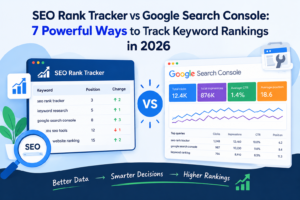
An SEO rank tracker helps you monitor selected keywords and understand their positions in Google Search. Google Search Console shows how people find your website and interact with its search results. Both tools can support better decisions, but they serve different purposes. In this guide, you will learn how to compare them, find useful ranking opportunities, monitor competitors, and improve your SEO strategy in 2026.
Google Search Console is a free service from Google that helps website owners understand their performance in Google Search. Its Performance report shows search queries, clicks, impressions, click-through rate, and average position. You can also review data by page, country, device, and date. These reports help you understand which pages receive visibility and which searches bring visitors to your website. Read Google’s official Performance report guide to learn how these metrics work.
A dedicated keyword rank tracker focuses on selected search terms and records their positions under specific tracking conditions. Depending on the tool, you may be able to choose a country, city, device, and search engine. You can then review ranking changes and compare results over time. This helps you monitor important keywords without manually searching Google for each term. A dedicated tracker is especially useful when you need a consistent view of a planned keyword list.
The main difference is the question each tool answers. Search Console tells you how your website performs in real Google Search activity. A rank tracker helps you monitor selected keywords under defined conditions. Search Console provides real clicks and impressions from Google. A tracker can provide more focused position monitoring, depending on its features. Neither tool provides every answer on its own.
| Feature | Google Search Console | Dedicated SEO rank tracker |
|---|---|---|
| Main purpose | Measure Google Search performance | Monitor selected keyword positions |
| Clicks and impressions | Yes | Depends on the tool and its integrations |
| Average position | Yes, based on Search Console’s reporting method | Usually reports tracked positions |
| Selected keyword lists | Uses queries found in your site’s data | Usually lets you define keywords to track |
| Location and device tracking | Offers country and device filters | Depends on supported tracking settings |
| Historical performance | Available within its reporting limits | Depends on the tool and its data retention |
| Competitor tracking | Does not provide a full competitor rank-tracking report | Some tools offer competitor monitoring |
Start with Search Console if you want to understand your website’s search performance without paying for a separate tracker. It can show you which queries bring impressions and clicks. A dedicated Google keyword ranking checker may help when you need to monitor a fixed list of target keywords or compare selected locations. Many SEO professionals use both because one measures search performance while the other supports focused ranking checks. Your choice should depend on your goals, budget, and reporting needs.
A keyword position tracker checks where a website appears for a selected search term under specific conditions. For example, a US marketing agency might track “SEO services in Chicago” for searches made in Chicago on mobile devices. The tracker records the result and compares it with earlier checks. Different tools use different methods, so you should review their tracking settings before comparing results. A ranking report is only useful when you understand what it measures.
Daily tracking can help when a business monitors important terms or investigates a sudden change. However, daily movement does not always signal a real problem. Search demand, competing pages, and changes in results can affect what you see. Weekly reviews often provide a useful balance for regular SEO work. Monthly reviews can help you evaluate broader progress. Choose a schedule that matches your goals, then use consistent dates and settings for fair comparisons.
Google results can differ between locations and devices. A business targeting customers in New York may not appear in the same positions as it does in Los Angeles. Mobile results may also differ from desktop results. These differences matter when you serve a local market or target several US regions. A useful website ranking checker should make its tracking conditions clear. If a tool supports location settings, choose locations that match your real audience instead of testing random cities.
Historical ranking data helps you understand whether a keyword is improving, declining, or staying stable. One ranking check gives you a snapshot. Several checks can reveal a trend. For example, a page that moves from position 18 to position 12 over several weeks may be gaining visibility. That does not prove the change will continue, but it gives you a reason to investigate further. Keep records of major content updates so you can compare ranking changes over time with the work completed on each page.
Begin with keyword research and choose terms that match your audience, services, and website content. A US software company might track phrases such as “project management software for small business” or “team task management tool.” These searches have different needs, so each keyword should lead to a suitable page. Consider relevance, business value, competition, and keyword difficulty where reliable data is available. Avoid tracking hundreds of unrelated phrases simply to make your report look impressive.
Before making changes, record your starting performance. Use Search Console to review existing queries and pages. If you use a tracker, save the current positions for your chosen keywords. Include the date, target page, location, and device in your records. This baseline helps you compare future results with a clear starting point. Without it, you may struggle to tell whether a change is meaningful or whether your website was already moving before the work began.
Choose locations that reflect your target market. If your business serves customers across the United States, begin with national tracking where your tool supports it. Add city-level tracking when local results matter to your business. A company serving only Austin does not need to track every US city. Keep location and device settings consistent during comparisons. Otherwise, a change in settings may look like an SEO improvement or decline when you are actually comparing different search conditions.
Review keyword positions alongside clicks, impressions, and organic search traffic. A keyword may improve in position without bringing many new visitors. Another keyword may remain stable while its impressions and clicks increase. This is why SEO performance tracking should include more than one metric. Search Console helps you measure actual Google Search activity. A tracker can help you follow selected terms. Together, these sources can provide a clearer picture of how your content performs.
When a keyword loses positions, investigate before changing the page. Check whether impressions and clicks also declined. Review the page’s content, indexing status, internal links, and competing results. If a keyword improves, identify which page is receiving visibility and whether visitors are taking useful actions. Do not assume every change came from your last update. Search performance can shift for several reasons. Record what you changed and review the results over a suitable period.
A simple tracking sheet can keep your workflow organized.
| Date | Keyword | Target page | Location | Position | Clicks | Next action |
|---|---|---|---|---|---|---|
| Week 1 | SEO services Chicago | SEO service page | Chicago, US | Record baseline | Record data | Review relevance |
| Week 1 | Project management software | Product page | United States | Record baseline | Record data | Check search intent |
| Week 1 | Keyword rank tracker | Tool page | United States | Record baseline | Record data | Review competitors |
These are example entries, not actual ranking results. Replace them with data from your own website.
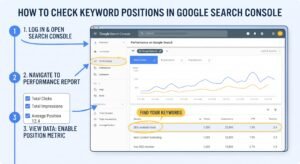
Open the Search results Performance report in Search Console. Select the Queries tab to see terms that caused your website to appear in Google Search. You can review clicks, impressions, CTR, and average position for those queries. This is a useful starting point because it shows searches where Google has already displayed your content. It may also reveal relevant terms you did not include in your original keyword plan. Google explains these features in its official Search Console documentation.
An impression means your result appeared in Google Search under Google’s counting rules. A click means someone clicked through to your website. CTR is the number of clicks divided by impressions, expressed as a percentage. If a page receives 500 impressions and 25 clicks, its CTR is 5%. These numbers help you assess keyword performance beyond position alone. A page with many impressions but few clicks may need a closer review of its title, snippet, search intent, or the competition shown in the results.
Search Console reports average position rather than one permanent rank for every search. The number reflects the position of your topmost result across the impressions included in the report. A page with an average position of 5 does not have to appear at position 5 in every search. Location, device, query, and other factors can affect individual results. Read Google’s explanation of impressions, position, and clicks before using average position to judge performance.
Look for relevant queries that receive impressions but few clicks. Check whether the page answers the searcher’s question clearly. Then review its title, description, and competing results. Also look for terms where your page appears but does not cover an important part of the topic. These are possible opportunities, not automatic instructions to rewrite content. A useful Google rank checker can add another view of selected keyword positions, but Search Console should remain an important source for actual search performance.
Use Search Console filters to narrow the data to a particular page, country, or device. For a US-focused campaign, select the United States when you want to understand performance from that market. Compare mobile and desktop results when device differences matter. You can also select a date range and compare it with an earlier period. These filters help you find patterns that broad reports may hide. For more guidance, read Google’s guide to understanding search performance.
Ranking reports become more useful when they lead to specific actions. The following seven methods help you find pages that may benefit from better content, clearer titles, stronger internal links, or more careful competitor research. Each method starts with a signal in your data. You then investigate the reason behind it before deciding what to change. This process makes keyword ranking analysis more practical than checking positions without a plan.
Keywords near the bottom of page one or on page two may offer opportunities when the page already matches the search intent. Review the top results and identify what they provide that your page lacks. You may need clearer explanations, better examples, stronger evidence, or a more useful structure. Do not add words just to make the article longer. Improve the parts that help readers make a decision. Track the keyword again after the update, but judge the result over time rather than after one check.
A page may appear often in Google Search but receive few clicks. Open the relevant queries and review the title and snippet shown for those searches. Does the page answer the question? Is the benefit clear? Does the title accurately describe the content? Improve the wording when it can better match the searcher’s needs. Avoid exaggerated claims or promises the page cannot support. Google’s Search Console performance guide also recommends reviewing high-impression, low-CTR opportunities.
Search Console may show related queries that you did not plan to target. These terms can reveal how people actually discover your content. Check whether the page answers those questions in enough detail. If several related searches reflect the same need, improve the existing page rather than creating many near-identical articles. If the searches have clearly different intent, a separate page may make sense. This approach helps you use real search data to guide your content plan instead of relying only on assumptions.
A decline in positions is a reason to investigate, not an automatic reason to rewrite. Compare similar date ranges and check whether clicks and impressions have also fallen. Review the pages affected, indexing status, recent updates, and changes in competing results. If many pages decline together, investigate broader site issues. If one page loses visibility, focus on that page first. Google’s guide to debugging search traffic drops offers a useful process for finding patterns before taking action.
Competitor research can show topics your website does not cover well. Identify pages that appear for searches relevant to your business. Then examine their purpose, structure, evidence, and usefulness. You do not need to copy their wording or create a page for every keyword they rank for. Focus on topics that matter to your audience and fit your expertise. A competitor keyword analysis should help you find unanswered questions and useful content ideas, not encourage you to publish thin pages just to target more terms.
Internal links help readers move between related pages and help search engines discover site content. Find pages that discuss a topic related to the page you want to improve. Add a link where it naturally helps the reader understand the subject or take the next step. Use descriptive anchor text so the destination is clear. Avoid adding the same keyword-rich link everywhere. Google’s link best practices explain how useful link text and crawlable links support navigation and discovery.
Record important changes to your content, such as a rewritten introduction, updated facts, improved internal links, or a clearer page title. Then compare relevant search data before and after the update. Check impressions, clicks, CTR, and keyword positions where available. Also review conversions if the page supports a business goal. A change in rankings does not prove that one edit caused it. Other factors may be involved. Still, careful records make it easier to learn which improvements deserve further testing.
Search results can vary by country because people use different terms, have different needs, and expect different services. A US searcher may use “apartment,” while a UK searcher may use “flat.” A business may also need separate pages for different markets. If you want to reach American customers, make sure the content, examples, spelling, and services match their needs. Use UK tracking separately when the UK is also an important market. Do not assume one country’s rankings represent performance everywhere.
Local businesses should track terms that reflect their real service areas. A plumber in Austin may care about “emergency plumber Austin” more than a broad national keyword. A law firm may need to monitor several cities if it serves them directly. Use a tool that supports the locations you need, and keep those settings consistent. Local rank tracking helps you evaluate local visibility, but rankings are only one part of local SEO. Business details, relevance, reviews, and the searcher’s location can also affect local results.
People use different devices to search, so it can be useful to review mobile rankings and desktop rankings separately. A mobile user may be looking for quick contact details or nearby services. A desktop user may be comparing several providers in more detail. These patterns depend on the audience and query, so do not treat them as universal rules. Check Search Console’s device filter and use a rank tracker with device settings if you need specific position checks. Also make sure your site works well on mobile devices.
Compare the same keyword only when it has a similar meaning and purpose in both markets. Some phrases may be common in the United States but less natural in the United Kingdom. Others may need different landing pages, examples, prices, or spelling. Review the search results in each market before deciding whether one page can serve both audiences. Your goal is to satisfy the same user need in a way that feels relevant locally. Separate reporting helps you understand which market needs more attention.
Create a fixed keyword list for each target market. Record the location, device, target URL, and date for every comparison. Review the data on a consistent schedule. If you change tracking settings, record that change so you do not mistake it for an SEO result. Search Console’s country filter can show how your website performs for users in the United States or United Kingdom. A tracker can complement that data when you need more specific local checks. The value comes from consistent measurement, not from collecting the largest number of reports.
Your business competitors and your search competitors are not always the same. A business selling software may compete in Google with review websites, comparison guides, and industry publications. These sites may rank for the same search terms even though they do not sell the same product. Identify the pages competing for the searches that matter to you. Then examine what makes those pages useful. This gives you a better understanding of the content and search intent you need to address.
A competitor ranking checker can help you monitor selected competitors if the tool supports that feature. Compare the keywords and pages that are relevant to your business. Look at the purpose of each page, the questions it answers, and how it guides readers. Do not assume a competitor’s ranking means its content is better in every way. Search results can change for several reasons. Use competitor data to find useful ideas and gaps, then create content that serves your own audience well.
A content gap exists when your website does not answer a relevant question that your audience searches for. Competitor pages can help you discover these questions. For example, a page about keyword tracking may need to explain location settings, reporting frequency, and the difference between average position and a specific rank check. Add missing information when it improves the reader’s understanding. Avoid publishing separate pages for tiny variations that share the same intent. Strong topic coverage should make your website more helpful, not simply larger.
Review competitor positions at regular intervals instead of reacting to every small movement. Compare the same keywords, locations, and devices wherever possible. Look for sustained patterns and changes in the pages appearing in search results. If a competitor gains visibility, investigate the relevant page and topic before changing your own content. You may find a missing answer, a stronger example, or a clearer page structure. Treat the data as evidence to examine rather than proof that one competitor action caused your ranking change.
Competitor analysis should lead to a short list of practical tasks. You might improve one important page, add a useful section, update internal links, or create a new resource for a distinct search need. Prioritize work based on audience relevance, business value, and the effort required. Do not chase every keyword a competitor ranks for. Some terms may attract the wrong audience or have little value for your business. A focused plan is easier to measure and more likely to support meaningful progress.
Search intent is the reason behind a search. Someone searching for “what is a keyword rank tracker” probably wants an explanation. Someone searching for “keyword rank tracker pricing” may be comparing tools. A page should match the need behind its target keyword. If the page does not answer the main question, adding the keyword more often will not solve the problem. Review the search results and make sure your content gives readers the information, examples, or next step they expect.
Content updates should make a page more accurate, complete, and useful. Replace outdated details, explain confusing terms, add relevant examples, and remove sections that no longer serve the reader. Do not update a page only because it is old. A recent date does not make weak content useful. Review the questions people ask and the information competing pages provide. Then fill genuine gaps with original explanations. Google’s SEO Starter Guide is a helpful reference for creating content that supports users and search engines.
Connect related pages so readers can find useful information without returning to Google. A guide about rank tracking might link to a detailed article about keyword research or a practical tool page. Choose anchor text that describes the destination naturally. Make sure the linked page adds value to the current discussion. Internal links can also help search engines discover pages and understand how topics connect across your website. Avoid excessive links or repeated anchors that make the content feel unnatural.
Your title should describe the page clearly and give the reader a reason to visit. Your meta description should summarize the value of the content without exaggerating. Include the target keyword when it fits naturally, but do not sacrifice clarity to force an exact phrase. Review the queries that bring impressions to the page. If those queries reveal a mismatch between the title and the reader’s needs, revise the wording. Better search snippets may improve CTR, but they cannot guarantee more clicks or higher positions.
Sometimes a page struggles because of a technical problem rather than weak writing. Check whether the page can be indexed, whether the correct canonical URL is set, and whether important pages have internal links. Review mobile usability and loading performance where relevant. Use Search Console reports and URL Inspection to investigate specific problems. Do not assume a technical issue exists just because a keyword falls. Confirm the evidence first, then fix the problem you actually find.
Set a clear goal for every important update. You might want more relevant clicks, better visibility for a group of queries, or more conversions from organic search. Compare suitable periods and account for normal changes in demand. Look at several metrics instead of judging success by a single position. If results do not improve, review whether the change addressed the real problem. SEO is a process of investigation and improvement. Tracking makes that process clearer, but it does not guarantee a specific result.
A dedicated tool can help when you need to follow a planned list of keywords and review changes in one place. It may be useful for website owners, freelancers, and agencies that report progress regularly. Before choosing a tool, check the actual features, supported locations, update schedule, keyword limits, and reporting options. A tool should fit your workflow rather than create more work. Search Console remains useful for measuring Google’s reported search performance, even when you use additional software.
SEO Rank Hunter by XpertCodes is presented on the XpertCodes website as a keyword tracking and search visibility option. Its published page describes keyword position monitoring, competitor insights, optimization suggestions, and reporting features. Review the live page to confirm which features are currently available and whether they fit your needs. The SEO Rank Hunter overview provides additional background. Evaluate the tool based on verified capabilities rather than assuming every feature will suit every website.
When comparing SEO ranking tools, look at the details that affect your daily work. Check how many keywords you can track, which locations and devices are supported, how often positions are updated, and how far back the history goes. Review the quality of the reports and whether the tool fits your budget. If you manage client websites, consider whether its reporting format is clear enough to share. The best SEO rank tracker for your situation is the one that meets your actual requirements, not necessarily the tool with the longest feature list.
Use a tracker to monitor selected keywords and use Search Console to understand how people interact with your search results. If a keyword improves, check whether impressions and clicks also change. If the tracker reports a decline, review the relevant query and page data in Search Console. The two sources may not match exactly because they measure rankings differently. Keep their purposes separate and compare them carefully. This approach gives you a more useful view of performance than relying on one metric or report alone.
Website owners may want a tracker when they need regular visibility checks for important keywords. Freelancers and agencies may value organized reports for client work. Businesses targeting several locations may need location-based monitoring if the tool supports those markets. Before making a decision, check the current feature list and pricing. If your website has only a few target keywords, Search Console and a simple tracking sheet may be enough. Choose additional software when it solves a clear problem in your existing workflow.
A keyword can move up or down without a lasting change in website performance. Search results, demand, and competing pages can shift. One daily check is not enough to prove that your SEO strategy is working or failing. Review longer periods and look for patterns in clicks, impressions, and positions. If a decline continues, investigate it. If the change disappears quickly, it may not require a major content update. A steady review process helps you avoid unnecessary edits.
Search Console’s average position is not the same as a single live search result. It summarizes position data across the impressions included in the report. A manual search can show a different result because the conditions may not match. If you need to monitor a specific keyword under set conditions, use a tracker that clearly defines its location and device settings. Then compare that result with Search Console for context. Do not label the numbers inaccurate simply because they measure different things.
A ranking check in Chicago should not be treated as identical to a check in Los Angeles. The same applies to mobile and desktop results. Before comparing reports, confirm that the keyword, location, device, and date range match. Record any changes to these settings. Otherwise, you may mistake a different measurement for an SEO improvement. Consistent settings are essential for useful comparisons, especially when you manage local campaigns or several markets.
A large keyword list does not automatically make an SEO campaign better. Irrelevant keywords can fill reports without helping you reach the right audience. Focus on terms that match your content, business goals, and target customers. Group related keywords by search intent and target page. Remove terms that no longer matter to your strategy. A smaller, well-planned list is easier to review and can make important changes more visible.
A better position does not always lead to more clicks. Search demand may be low, the snippet may not match the query, or other search features may affect how users interact with results. A page can also gain impressions for queries that do not match its main purpose. Check clicks, CTR, and relevant conversions alongside rankings. If visibility rises but useful traffic does not, investigate the queries and pages involved. The aim is not simply to rank; it is to attract the right visitors.
Adding keywords repeatedly will not fix a page that fails to answer the searcher’s question. Search engines need to understand the page, but readers need clear and useful information. Review the questions behind your target queries and make sure the content answers them directly. Add detail where it helps. Remove repetition where it does not. Strong SEO content should solve the reader’s problem first and use keywords naturally throughout the explanation.
For many website owners, Search Console is a useful starting point. It shows queries, clicks, impressions, CTR, and average position from Google Search. However, it does not work exactly like a dedicated rank tracker that checks a selected keyword under specific conditions. If you need a planned keyword list, repeated location checks, or additional reporting features, a separate tool may help. The right choice depends on what you need to measure.
Yes, some tools offer free plans, trials, or limited checks. A free keyword rank checker may be enough for a small website or a short list of keywords. Before using one, check its limits, update frequency, supported locations, and reporting features. Also confirm whether the tool measures the keywords and markets you care about. Free access can be useful, but it does not mean every feature is included.
Choose a schedule that matches the importance of your keywords and the pace of your SEO work. Daily checks may help with important terms or investigations. Weekly reviews can provide a clearer picture of regular movement. Monthly comparisons can help you judge broader trends. Do not make major decisions based on one isolated result. Review positions alongside clicks, impressions, and other relevant business measures.
Search Console reports average position across the impressions included in its data. A manual search shows a particular result under the conditions of that search. Location, device, query, and other factors can affect the result you see. Search Console data may also be aggregated across many searches. These differences are normal. Use each source for its intended purpose and avoid expecting the numbers to match exactly.
You can review country and device performance in Search Console, while city-level rank checks depend on the tracking tool you use. Some tools offer more specific location settings than others. If your business serves several cities, choose supported locations that match your service area. Keep those settings consistent when comparing results. Remember that local visibility is only one part of a wider local SEO strategy.
No. An organic ranking checker or rank tracker measures visibility; it does not guarantee a better position. Higher rankings depend on many factors, including relevance, content quality, technical accessibility, competition, and changes in search results. Tracking helps you identify possible problems and evaluate your work. The improvement comes from the actions you take, not from checking a report by itself.
A rank tracker monitors selected keywords over time. A keyword research tool helps you discover search terms and evaluate their potential. Some products combine both functions, so check the feature list before choosing one. Research helps you decide which keywords deserve attention. Tracking helps you understand how your website performs for the keywords you choose. Both can support an effective SEO workflow when used for the right purpose.
Google Search Console is a strong starting point for understanding actual Google Search performance. It helps you find queries, measure clicks, review impressions, and understand average position. A dedicated search engine rank tracker may add value when you need regular checks for selected keywords, locations, or devices. These tools serve different purposes, so you do not need to treat them as competitors. Choose the setup that answers your questions and fits your budget.
Good SEO performance tracking starts with clear goals and consistent measurement. Review your search queries, investigate meaningful changes, and improve pages when the evidence supports an update. Use competitor research to discover useful gaps, not to copy other websites. Keep records of important changes and judge results over time. Most importantly, focus on the people behind the searches. Helpful content, clear page structure, and relevant internal links give readers a better experience and support a sound SEO process.
Start by reviewing your most important pages in Search Console. Identify the queries that bring relevant impressions and clicks. Then decide whether you need a dedicated tracker to monitor selected keywords more consistently. If you want to explore another option, visit SEO Rank Hunter by XpertCodes and check its current features against your needs. A useful tracking process does not need to be complicated. It needs to give you reliable information and help you choose your next action.