Close
Xpertcodes – Where Expertise Meets Innovation | Code | Consult | Expert
A potential customer may visit your website before contacting your business. Within a short time, they want to understand what you offer, whether you seem reliable, and how they can work with you. If your website looks confusing or outdated, they may leave without exploring your services.
Professional Business Website Design helps you create a clear, useful, and trustworthy online experience. It combines good visuals, simple navigation, fast performance, and honest business information. These features matter to small businesses, startups, and established companies across the USA and UK.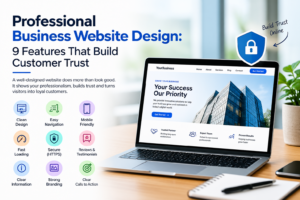
However, an attractive website alone is not enough. Visitors also need useful information, genuine proof, and an easy way to contact you. This guide explains nine important features that help build customer trust and support business growth. It also covers website costs, common mistakes, and how to choose the right design company.
Your website often introduces your business to people who have never met you. They cannot see your office, speak to your team, or examine your services in person. Instead, they judge your business through the information and experience your website provides. A clear layout, accurate details, and consistent branding can help visitors feel more confident.
Good Business Website Design also makes it easier for people to understand your offer. Visitors should quickly find your services, learn how you work, and discover what makes your business useful. These details are especially important when customers compare several providers before making a decision. A professional website supports trust, but your claims must remain honest and your service must deliver what you promise.
The best websites do more than look attractive. They answer questions, remove confusion, and help visitors take the next step. These Business Website Features work together to create a smooth experience. You do not need a complicated design to achieve this. You need a website that serves your customers and supports your business goals.
Whether you need Website Design for Small Businesses or a larger corporate website, start with the needs of your audience. Think about what visitors want to know before they contact you. Then make that information easy to find. The following nine features provide a practical foundation for Trustworthy Website Design.
A clean layout helps visitors focus on what matters. Use readable fonts, enough spacing, clear headings, and a consistent colour scheme. Place your main service or offer near the top of the homepage. Visitors should not have to search through several sections to understand what your business does. A simple layout can look more professional than a page filled with effects and competing messages.
Modern Business Website Design should also create a clear visual order. Your main heading should stand out, while supporting text explains the offer. Images should support the message rather than distract from it. For example, a consulting firm could introduce its services, explain its value, and provide a contact button in the first screen. This is one of the most useful Website Design Best Practices because it makes the visitor’s first steps easier.
Visitors should be able to move through your website without confusion. Keep the main menu simple and use labels people understand. Pages such as Services, About, Portfolio, and Contact are familiar to most visitors. Use descriptive page names instead of vague labels. A clear menu helps people find answers and reduces the effort needed to explore your business.
Good Website Navigation is an important part of User Experience (UX) Design. Keep related information together and provide links to useful next steps. For example, a visitor reading about web development should be able to reach your project portfolio or contact page easily. A User-Friendly Business Website should also have working links, clear page headings, and a logical structure on both desktop and mobile devices.
Many customers browse websites on phones and tablets. If your website only works well on a desktop, you may create problems for a large part of your audience. Text should remain readable without zooming. Buttons should be easy to tap, and forms should fit smaller screens. Visitors should not need to scroll sideways to read your content.
Responsive Website Design adjusts the page layout to different screen sizes. A Mobile-Friendly Business Website should also load its images correctly and keep its navigation easy to use. Test your main pages on real devices, not just a desktop preview. Check service pages, contact forms, menus, and checkout steps if you sell online. Strong Mobile Responsive Website Design helps visitors complete tasks wherever they browse.
Visitors may leave when a website takes too long to respond. Slow pages interrupt browsing and make simple tasks feel difficult. Performance can also affect how people view your business. A slow contact page may create doubt, even when your services are excellent. That is why Website Loading Speed should be part of the design and development process.
Start by compressing large images, reducing unnecessary scripts, and choosing suitable hosting. Keep plugins and other website tools under control. Then test important pages with Google’s PageSpeed Insights. Review the results instead of focusing on one score alone. Google’s Core Web Vitals measure important parts of loading, responsiveness, and visual stability. These measures help teams find problems that affect the user experience.
Visitors need to know who you are and how to reach you. Explain your services in plain English and provide accurate company information. Add a working email address, a contact form, and a suitable phone number if your business accepts calls. If you serve customers from a physical location, provide the correct address and relevant business hours.
Useful Website Contact Forms should ask only for information you need to respond. A short form may request a name, email address, and a brief description of the project. Explain what happens after someone submits it. For USA and UK audiences, also make your privacy practices clear when collecting personal information. Accurate details and a simple contact process can make your business feel more approachable.
Potential customers often want evidence before choosing a service provider. Genuine reviews, relevant case studies, client feedback, and professional credentials can help them evaluate your business. These Customer Trust Signals should be easy to verify where possible. If you display a client logo, make sure you have permission to use it. If you publish a testimonial, keep its meaning accurate and identify the source appropriately.
Customer Testimonials work best when they explain a real experience. A useful review might describe the project, the service provided, and the result the customer observed. Do not invent reviews or promise results that you cannot support. If your business is new, show sample projects clearly labelled as demonstrations, explain your process, or publish helpful information about your expertise. Trust grows when your website gives visitors honest reasons to believe your claims.
Visitors should be able to browse your website through a secure connection. HTTPS uses encryption to protect information exchanged between a visitor’s browser and your website. A valid TLS certificate is part of this process. HTTPS is especially important when users submit contact details, sign in, or make payments. Browsers may also warn visitors when a site does not use a secure connection.
Website Security and HTTPS are important, but they are not the whole security plan. Keep your website platform, themes, and plugins updated. Use strong passwords and suitable access controls. Protect forms against spam and collect only the information your business needs. If you handle customer data, explain your privacy practices clearly and follow the laws that apply to your business. A secure connection supports trust, but it does not prove that every claim on a website is genuine.
Your website’s images and visual style should match the business you want customers to recognise. Use consistent colours, fonts, logos, and image styles across your pages. Choose images that support your message and help visitors understand your products or services. For example, a construction company could show real projects, while a software company could use clear product screenshots.
Strong Website Branding and Visual Identity make your website feel consistent and memorable. Use genuine photographs when they add value, and optimise them so they do not slow down your pages. Avoid images that look unrelated to your business or promise something you cannot deliver. When reviewing Business Website Design Examples, look beyond appearance. Notice how well each website combines branding, useful information, readability, and clear next steps.
A visitor may like your website but still be unsure what to do next. A clear call to action solves this problem. Use wording that explains the next step, such as “Request a Quote,” “Book a Consultation,” or “Contact Our Team.” Choose language that matches your service and the visitor’s level of interest. A person researching options may prefer a consultation over an immediate sales request.
Clear Calls to Action should be easy to find without taking over the whole page. Place them where they make sense, such as after a service explanation or project example. Make sure each button leads to the correct page or form. This supports Website Design for Lead Generation by helping interested visitors contact your team. Track form submissions and qualified enquiries to understand whether your design supports real business goals.
Customers often compare several businesses before making contact. They look for clear services, relevant experience, honest information, and signs that a company understands their needs. If your website answers these questions, visitors can make better-informed decisions. If important details are missing, they may choose a competitor whose offer is easier to understand.
Website Design That Converts Visitors into Customers connects useful information with a clear next step. For example, a web development company could explain its services, show relevant work, outline the project process, and invite visitors to discuss their needs. This approach can reduce uncertainty and support enquiries. However, your Website Conversion Rate also depends on factors such as traffic quality, pricing, competition, and the strength of your offer.
Even a good business can lose potential customers through a poorly designed website. Outdated information, broken links, confusing menus, and spelling errors can make visitors question the company’s attention to detail. Large pop-ups and crowded pages can also interrupt the browsing experience. These Common Business Website Design Mistakes are often avoidable with regular testing and careful planning.
Another problem is making claims without proof. Promising guaranteed results or displaying fake reviews can damage your reputation. A website should also avoid hidden fees, unclear service terms, and forms that request unnecessary personal information. Review your main pages regularly and ask someone unfamiliar with your business to test them. Their questions may reveal problems you have missed.
DIY website builders can be useful when you need a simple website and have time to manage it yourself. They often provide ready-made templates, hosting options, and tools for adding pages. This can make them suitable for personal projects, early-stage businesses, or companies with limited budgets. However, you may need to handle layout decisions, content, performance, and technical issues on your own.
Professional Website Design Services can help when your business needs a more tailored experience. A professional team can plan the website around your audience, services, brand, and goals. Custom Website Design for Businesses may also support special features or integrations. The right choice depends on your needs, not just the size of your budget. Some businesses can start with a builder and move to a custom solution as they grow.
| Factor | DIY Website Builder | Professional Website Design |
|---|---|---|
| Initial setup | You build the website using available tools | A team plans and builds the website with you |
| Design flexibility | Depends on the platform and template | Can be tailored to your needs |
| Time required from you | Often higher during setup and updates | Often lower for technical tasks |
| Technical support | Depends on the platform and your skills | Depends on the service agreement |
| Best suited for | Simple sites and early-stage projects | Businesses needing tailored design or functionality |
Choosing the right provider starts with understanding your business goals. Review its portfolio and look for projects similar to yours. Check whether the websites work well on mobile devices and make information easy to find. Ask how the company handles planning, content, testing, launch, and future updates. A reliable provider should explain the process in language you understand.
Before you Hire a Business Website Designer, request a written proposal. It should explain the scope, deliverables, timeline, payment terms, and any recurring costs. Ask who will own the domain, website files, and accounts after launch. Also confirm what support is available if something breaks. Whether you need a Small Business Web Design Agency or a larger Website Design and Development Company, choose a partner who communicates clearly and sets realistic expectations.
The cost of Professional Business Website Design depends on the size and complexity of your project. A simple service website usually requires less work than a large website with custom tools, online payments, or many integrations. Content writing, branding, photography, migration, and ongoing support can also affect the final quote. That is why one fixed price cannot accurately describe every business website.
If you are comparing Affordable Business Website Design options, compare what each proposal includes. A lower initial price may not cover content, maintenance, or important features. Ask for separate costs for design, development, hosting, domain renewal, and ongoing support. For businesses in the USA and UK, prices can vary widely by provider and project scope. Request a quote based on your actual requirements rather than choosing on price alone.
| Cost factor | Why it matters |
|---|---|
| Number of pages | More pages often require more design and content work |
| Custom features | Booking systems, integrations, and customer portals add complexity |
| Content and branding | Copywriting, photography, and visual identity may require separate work |
| E-commerce | Product pages, payments, shipping, and checkout need extra planning |
| Maintenance | Updates, backups, security checks, and support may create recurring costs |
XpertCode offers web development, UI/UX design, and SEO services. These areas can work together to create a website that looks professional, serves visitors, and supports your business goals. You can explore its web development services to learn more about its approach to responsive websites, performance, and custom development. You can also review its UI/UX design services for more information about its design work.
A successful project should begin with your audience, services, and business objectives. It should then move through planning, design, development, testing, and launch. XpertCode also provides SEO optimization services, which may be relevant if you want to improve your website’s search visibility. Review the service details and discuss your requirements before deciding whether the company is the right fit.
Business owners often have similar questions before investing in a website. They want to know what makes a site look professional, which features matter most, and how much they should budget. The answers depend on the business, its customers, and the purpose of the website. The following questions cover the main points to consider.
Use these answers as a starting point for planning your project. Your final design should reflect the needs of your audience rather than follow a template without thought. A professional website should make information clear, help visitors complete tasks, and give them a straightforward way to contact your business.
A professional website uses a clear layout, readable text, consistent branding, and simple navigation. It also provides accurate business information, working links, and a clear way to make contact. Fast performance and mobile usability matter too. The aim is to help visitors understand your business without unnecessary effort.
Good design makes information easier to find and understand. Genuine reviews, clear service descriptions, secure connections, and accurate contact details can reduce uncertainty. A website should also set honest expectations about pricing, timelines, and results. Trust grows when the website’s promises match the real service.
Yes. Many people use phones to research companies, compare services, and submit enquiries. A mobile-friendly website keeps text readable and buttons easy to use on smaller screens. It should also provide simple navigation and forms that work properly. Test important pages on different screen sizes before launch.
The cost depends on page count, design requirements, content, custom features, and ongoing support. A basic website usually needs less work than a complex platform or online store. Ask providers for written quotes with clear deliverables. Compare the full cost, including maintenance and renewals, rather than only the initial price.
Consider a Business Website Redesign when your website looks outdated, works poorly on mobile devices, or makes important information difficult to find. Other warning signs include broken features, inaccurate content, and a contact process that creates friction. Redesigning may also make sense when your services or audience have changed. Start by identifying the problems and measuring what needs to improve.
Your website should help people understand your business and feel confident about taking the next step. Clear navigation, useful content, mobile-friendly layouts, strong performance, genuine reviews, and secure forms all contribute to that experience. The best design is not necessarily the most complex. It is the one that helps your customers find answers and complete their goals.
If your current website no longer reflects your business, explore your options before investing in a redesign. Consider the features you need, the support you expect, and the results you want to measure. Visit XpertCode’s website to explore its services, or use the contact page to discuss your project. A clear plan is a practical first step towards a website that supports customer trust and business growth.
For website performance guidance, read Google’s Core Web Vitals documentation. It explains how to assess loading, responsiveness, and visual stability. For accessibility, the W3C Web Accessibility Initiative offers guidance on making websites more usable for people with different needs. These resources can help you make informed decisions during design and development.