Close
Xpertcodes – Where Expertise Meets Innovation | Code | Consult | Expert
Ranking in Google feels great. Staying visible is harder.
A page can reach position #5 today and fall to #14 weeks later. Another page may sit at #17 for months before suddenly reaching Page 1. Without proper SEO rank tracking, you might see the movement but miss the reason behind it.
This guide takes you beyond simply checking a number. You’ll learn how to track Google rankings, choose useful keywords, understand ranking data, find Page 2 opportunities, monitor competitors, investigate ranking drops, and turn SEO data into practical improvements.
Whether you run a small business in the USA, manage a UK website, publish a blog, sell products online, or work with SEO clients, this guide gives you a practical system you can actually use.
For reliable SEO measurement, use official Google documentation whenever possible. Google Search Console provides data about clicks, impressions, CTR, average position, queries, pages, countries, devices, and search appearance.
Google Analytics provides additional information about traffic acquisition and where visitors come from. Together, these tools can help you connect search visibility, organic traffic, user behavior, and business performance.
Official resources:
Google Search Console Performance Report
Google Analytics Traffic Acquisition Report
SEO rank tracking is the process of monitoring where your website appears in Google for specific searches. If your page appears at position #7 for a target keyword, the tracker records that ranking position. It can then compare the position with earlier results.
That sounds simple. However, the real value comes from the pattern. You can discover which pages are improving, which keywords are slipping, and where new opportunities are appearing. This turns rankings into useful evidence for your SEO strategy.
Imagine you own a website selling running shoes. Your article ranks #28 for “best running shoes for beginners.” A few months later, it reaches #9. That movement tells you something important. Google now sees your page as a stronger result for that search query.
However, rankings aren’t the final goal. You want qualified visitors, leads, sales, or another business outcome. A keyword at #2 can be less valuable than a highly relevant commercial term at #8.
A rank tracker checks your selected keywords in Google and records the results. It can monitor the search position, page URL, location, device, and SERP features. The system then stores those results so you can compare them later.
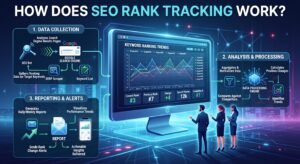
The settings matter more than many beginners realize. A ranking in New York may differ from one in London. Mobile results can also differ from desktop results. That’s why accurate Google rank tracking uses consistent locations, devices, languages, and search settings.
| Stage | What Happens |
| Keyword selection | You choose important search terms |
| Baseline | You record the starting position |
| Tracking | The tool checks rankings regularly |
| Comparison | Current and previous positions are compared |
| Analysis | You identify gains, losses, and opportunities |
| Action | You improve pages based on the findings |
The important part comes after tracking. Data sitting inside a dashboard won’t improve your website. Your decisions based on that data can.
A Google keyword ranking shows where a webpage appears in Google’s organic search results for a particular query. If your page appears as the fourth organic result, its ranking position is #4.
Yet modern Google results are more complicated than a simple list. A search engine results page may contain ads, a featured snippet, People Also Ask, maps, images, videos, shopping results, and other elements.
Suppose your page ranks #3. That sounds excellent.
Now imagine a large featured snippet appears above the organic results. Several other SERP elements may also appear before your listing. Your page can still hold position #3 while receiving fewer clicks than expected.
That’s why modern SERP tracking should consider both rankings and the appearance of the search results.
Good SEO performance tracking helps you replace assumptions with evidence. You can see whether an optimization actually improved visibility. You can also identify pages that need attention before traffic disappears completely.
For example, suppose you update an article and its main keyword moves from #18 to #11. That’s encouraging. If several related keywords also rise, the evidence becomes stronger. You may have improved the page’s content relevance.
| Question | Useful Data |
| Are rankings improving? | Position history |
| Which pages are winning? | Page-level rankings |
| Which keywords are falling? | Ranking changes |
| Where are opportunities? | Page 2 keywords |
| Are competitors gaining? | Competitor rankings |
| Is visibility growing? | Search visibility |
| Are rankings creating business value? | Conversions and revenue |
This makes SEO position tracking useful for both beginners and experienced marketers.
Don’t track keywords simply because they have large search volume. Start with terms that connect to your website’s purpose. Your list should include a primary keyword, related secondary terms, commercial searches, branded queries, and useful long-tail phrases.
Search intent matters too. A person searching “what is technical SEO” may be learning. Someone searching “technical SEO agency UK” may be looking for a service. Those keywords deserve different strategies.
| Keyword Type | Example | Main Intent |
| Informational | what is SEO | Learning |
| Commercial | best SEO tools | Research |
| Transactional | buy SEO software | Purchase |
| Local | SEO agency London | Local service |
| Branded | Semrush pricing | Brand research |
| Long-tail | best SEO tracker for small business | Specific need |
Also consider search volume, keyword difficulty, competition, and business value. A keyword with 500 searches can sometimes be more valuable than one with 50,000 searches.
If you’re wondering how to track keyword rankings, start by creating a focused keyword list. Add the searches that matter most to your pages, products, services, or business goals.
Google Search Console can show the queries that brought users to your website. You can sort these queries by clicks, impressions, or CTR to identify important search opportunities.
Official source: Google Search Console Common Tasks & Use Cases
Start by recording the keyword and target URL. Then record the location and device. Next, capture the starting position. Finally, monitor the same keyword under consistent settings.
For larger websites, use Google Search Console or a dedicated keyword tracking tool. These methods make comparison much easier.
Manual searching works for a few keywords. It becomes tedious when you manage hundreds of terms. An automated SEO rank tracker can monitor your selected keywords on a regular schedule.
The tool stores the current position, previous position, ranking history, and other information. Many platforms can also send a ranking alert when important changes occur.
Imagine tracking 500 keywords manually. Even if each search takes only one minute, that’s more than eight hours. Automation handles the repetitive work while you focus on analysis and optimization.
That’s the real benefit of search engine rank tracking. It turns a repetitive task into an ongoing measurement system.
SEO Rank Tracking vs Google Search Console
Google Search Console and a dedicated rank tracker overlap in some areas. However, they serve different purposes.
Google Search Console shows actual search performance for your website. You can see queries, impressions, clicks, CTR, pages, countries, devices, and average position. A dedicated tracker usually gives you tighter control over selected keywords and locations.
Use Search Console to understand how Google users actually discover your website. Use a rank tracker to monitor a controlled keyword set and compare positions over time.
Using both is often better than relying on either one alone.
| Feature | Google Search Console | Rank Tracker |
| Actual website search data | Yes | No, generally estimated |
| Selected keyword monitoring | Limited | Strong |
| Competitor tracking | Limited | Usually available |
| Historical ranking data | Yes | Yes |
| Location control | Available | Often more granular |
| Ranking alerts | Limited | Common |
| Keyword discovery | Excellent | Varies |
Google Search Console and a dedicated rank tracker overlap in some areas. However, they serve different purposes. Google Search Console shows actual search performance for your website, including clicks, impressions, CTR, average position, queries, pages, countries, and devices.
Use Search Console to understand how people actually discover your website. Use a dedicated tracker to monitor a controlled keyword set across specific locations and devices. Google also explains that search results can vary by time, location, device, and search history, which is why manually checking one Google result isn’t always a reliable ranking measurement.
Official source: Google Search Console Performance Report
Google Analytics answers a different question. It shows what visitors do after reaching your website. The Traffic acquisition report helps you understand where visitors come from and how different traffic sources contribute to sessions and engagement.
For example, your rank tracker may show that a keyword moved from #12 to #6. Search Console can show whether impressions and clicks increased. Google Analytics can then help you understand what those visitors did after arriving.
Official source: Google Analytics Traffic Acquisition Report
Suppose a page moves from #12 to #7. Your rank tracker shows the improvement. Google Search Console shows more impressions and clicks. Google Analytics then shows whether those visitors engaged or converted.
That creates a much clearer SEO performance picture.
There isn’t one universal best SEO rank tracking tool. The right option depends on your website size, budget, locations, keyword volume, reporting needs, and technical requirements.
A blogger might need a simple dashboard. An agency may need multiple projects, white-label reports, competitor monitoring, and local tracking. An enterprise site may need thousands of keywords and API access.
Look at data accuracy, keyword limits, location settings, mobile tracking, historical data, competitor tracking, SERP features, reporting, alerts, and integrations.
A beautiful dashboard isn’t enough. Your tool should help you answer real SEO questions.
Before choosing SEO rank tracking software, define what you actually need. A small website doesn’t need every advanced feature. An agency probably does.
Your first priority should be reliable ranking data. After that, consider keyword limits, locations, devices, historical records, competitor tracking, reporting, and integrations.
| Feature | Why It Matters |
| Keyword limits | Determines tracking capacity |
| Location tracking | Useful for local SEO |
| Mobile tracking | Measures mobile visibility |
| Historical data | Reveals trends |
| Competitor tracking | Shows competitive movement |
| SERP features | Tracks modern search results |
| Alerts | Helps detect major changes |
| Reports | Simplifies analysis |
The best rank tracking tool is the one that fits your workflow without creating unnecessary complexity.
Local SEO has a special challenge. Your ranking can depend heavily on where the search happens. A bakery in Chicago doesn’t need to rank equally across the entire USA. It needs strong visibility around its service area.
Local SEO rank tracking helps measure those geographic differences. You can monitor city terms, service terms, “near me” searches, and local competitors.
Track important service keywords alongside city and location variations. Then compare your visibility with nearby competitors. This creates a clearer picture of your local search rankings.
For example, a plumber could monitor “emergency plumber Chicago” and “24 hour plumber Chicago.” Those searches may have different competition and intent.
Google Maps requires special attention because local results don’t behave exactly like normal organic listings. Google Maps rankings can vary across nearby locations.
A local business can appear strongly in one part of a city and much lower several miles away. This is why geographic tracking is useful for businesses that depend on local customers.
Local rankings can involve proximity, relevance, business information, reviews, citations, and overall local authority. Your Google Business Profile also plays an important role in the local search ecosystem.
A useful local tracking campaign should monitor both Maps visibility and organic local pages.
WordPress websites often contain many different page types. You may have blog posts, service pages, categories, products, landing pages, and author pages. Tracking helps you understand which pages actually gain search visibility.
A useful SEO rank tracker for WordPress can connect keyword movement with specific URLs. When rankings fall, inspect the page rather than immediately assuming the entire site has a problem.
Check the page’s title tag, heading structure, internal links, content quality, indexing, canonical URL, and search intent. Also inspect technical SEO issues such as redirects, broken links, duplicate content, and crawlability.
Competitors can teach you a lot without you copying them. Competitor keyword tracking shows which searches send visibility toward competing websites.
Start with businesses that genuinely compete for your target audience. Then compare their keyword rankings with yours. Look for queries where they rank well while your website has little or no visibility.
Suppose your competitor ranks #4 for a valuable keyword. Your page ranks #27. Don’t simply copy their article. Study what searchers need and identify the content gap.
Maybe their page answers five important questions that yours ignores. That gives you a legitimate improvement opportunity.
Page 2 keywords are among the most interesting opportunities in SEO. These terms already show some relevance. Your page simply hasn’t earned a strong enough position yet.
Page 2 keyword tracking usually focuses on positions 11–20. These keywords deserve attention when they have useful search volume, strong relevance, and realistic competition.
Imagine you have these rankings:
| Keyword | Position | Monthly Impressions | Priority |
| SEO rank tracker | 14 | 1,800 | High |
| keyword tracking software | 17 | 900 | High |
| SEO audit tool | 23 | 400 | Medium |
| technical SEO guide | 48 | 150 | Low |
The first keyword deserves attention because it combines strong relevance with meaningful visibility.
This is why keywords ranking on page 2 can become valuable optimization targets.
One ranking snapshot can mislead you. Ranking history provides context. You can compare your current position with the previous week, month, or quarter.
Good tracking shows ranking movement, trends, winners, losers, and volatility. This helps you distinguish genuine progress from temporary noise.
A keyword moving from #20 to #16 to #13 shows steady progress. A keyword jumping between #8 and #22 every few days may have stronger ranking volatility.
Don’t treat both situations the same. One suggests gradual improvement. The other needs investigation and patience.
Good SEO performance tracking combines ranking data with real website outcomes. Track rankings alongside impressions, clicks, CTR, organic traffic, conversions, leads, and revenue.
Google Search Console lets you analyze clicks, impressions, CTR, and average position. You can also group performance data by queries, pages, countries, devices, and search appearance.
Official source: Google Search Console Performance Metrics
| Metric | Question It Answers |
| Position | Where do we rank? |
| Impressions | How often do we appear? |
| CTR | Do people click? |
| Organic traffic | How many visitors arrive? |
| Conversions | Do visitors take action? |
| Revenue | Does SEO create business value? |
This turns SEO results into a more complete business picture.
You don’t need to stare at rankings every hour. Daily tracking can be useful for important campaigns or major changes. Weekly reviews work well for many active SEO projects.
Monthly analysis provides a broader perspective. It helps you understand ranking trends without getting distracted by small daily changes.
| Website Situation | Suggested Review |
| New website | Weekly |
| Active SEO campaign | Weekly |
| Major website changes | Daily or several times weekly |
| Established website | Weekly or monthly |
| Large SEO agency | Automated tracking plus scheduled reports |
The important thing is consistency. Compare similar periods using the same settings.
A ranking drop means a page or keyword has moved lower in Google’s results. However, the drop itself doesn’t explain the cause.
It could come from stronger competitors, changing search intent, technical problems, content changes, algorithm changes, or SERP changes. Sometimes the movement is simply temporary.
Suppose your page falls from #8 to #11 for one day. Don’t immediately rewrite the entire article.
Instead, check whether other keywords dropped too. Look at the page’s traffic and impressions. Review competitors. Check indexing. This approach creates better ranking drop analysis.
Google rankings naturally fluctuate. Your competitors publish new pages. Existing content gets updated. Search intent changes. Google tests different results. SERP layouts also evolve.
That’s why ranking fluctuations aren’t automatically bad news. Think of rankings like positions in a busy race. A small movement doesn’t mean someone has crashed.
A sustained decline deserves more attention than a short fluctuation. If hundreds of keywords fall across many pages, investigate the broader website.
If only one page drops, start with that page and its target queries.
Start with evidence. Identify which keywords declined and which URLs were affected. Then compare the current SERP with the previous search landscape.
Check indexing, technical SEO, content changes, internal links, backlinks, competitors, and search intent. Look for changes that happened before the decline.
Sometimes the page has plenty of content but answers the wrong question. In that situation, adding another 1,000 words won’t solve the problem.
Instead, improve content relevance, structure, examples, internal links, and intent alignment. Update outdated information when needed. Then give Google time to reassess the page.
Google search results now include many visual and interactive elements. These include featured snippets, People Also Ask, image results, videos, local packs, shopping results, sitelinks, and rich results.
Your page might rank #4 organically while appearing inside a featured snippet. That can change its visibility dramatically.
Traditional rank tracking asks, “Where is my page?”
Modern SERP feature tracking asks a better question:
“How does my page appear within the entire search result?”
That broader view helps you understand actual search visibility.
International websites should never assume one country represents another. A page can rank #4 in the UK and #19 in the USA for a similar search.
International rank tracking lets you monitor those differences. Set the correct country, language, city when necessary, and device.
A UK website might target “car insurance quotes.” An American audience may use different terminology around the same topic. Even when the subject is identical, keyword relevance and search behavior can differ.
Your tracking strategy should reflect those regional differences.
Mobile and desktop searches can produce different layouts and experiences. That’s why mobile rank tracking matters for websites with large mobile audiences.
Desktop tracking remains useful too. Business researchers, professionals, and some e-commerce shoppers may still use larger screens heavily.
Also inspect mobile usability, page speed, Core Web Vitals, navigation, and readability. A strong ranking is useful only when the page provides a good user experience after the click.
Small businesses should keep tracking focused. You don’t need thousands of keywords to understand your SEO.
Start with the services, products, locations, and commercial searches that matter most. A SEO rank tracker for small businesses should make those terms easy to monitor.
A local electrician might track 30–50 keywords around emergency services, installation work, repairs, and nearby cities. That focused dataset can reveal more useful information than a giant list of unrelated searches.
Quality beats quantity.
Agencies have different needs. They may manage dozens of websites across different industries and locations. Therefore, an SEO rank tracker for agencies needs scale, organization, and clear reporting.
Client reports should explain movement in plain English. Instead of saying “visibility increased 12%,” explain what caused it and what the team will do next.
Track keyword groups, competitors, locations, devices, winners, losers, Page 2 opportunities, and major SERP changes. Then connect the findings to content and technical tasks.
That makes ranking data useful during client strategy meetings.
E-commerce SEO has several layers. You may rank for brands, products, categories, features, comparisons, and transactional searches. Tracking all of these gives you a better picture of product visibility.
A product page may rank for a very specific query. A category page can capture a broader search. Therefore, don’t assume every important keyword belongs on a product page.
Monitor product keywords, category terms, shopping results, brand searches, and seasonal queries. Also watch product rankings after major changes to descriptions, prices, stock, or category structure.
A good report doesn’t drown the reader in numbers. It highlights movement and explains what deserves attention.
Google Search Console lets you change date ranges, compare performance, filter data, and examine trends over different time periods. Google recommends using weekly or monthly views when you want to understand longer-term trends without overreacting to daily fluctuations.
Official source: Google Search Console Filtering & Comparison Guide
| Keyword | Previous | Current | Change | Next Step |
| SEO rank tracker | 14 | 8 | +6 | Improve supporting content |
| keyword tracker | 7 | 10 | -3 | Investigate SERP changes |
| Google rank tracking | 19 | 13 | +6 | Strengthen internal links |
A strong ranking report should end with actions. Otherwise, it’s just a prettier spreadsheet.
The right metrics depend on your goals. At minimum, consider keyword position, impressions, clicks, CTR, organic traffic, conversions, and ranking distribution.
For commercial websites, include leads, sales, and revenue when possible. For publishers, organic sessions and engagement may matter more.
More data doesn’t automatically mean better analysis. Choose metrics that answer business questions.
A useful report should help someone understand what improved, what declined, why it happened, and what the SEO team should do next.
One major mistake is tracking irrelevant keywords. Another is checking rankings without recording location and device. Some people also react to every small fluctuation.
A deeper mistake is confusing ranking with success. A website can rank well but attract the wrong audience. It can also receive excellent traffic while converting poorly.
| Mistake | Better Approach |
| Tracking random keywords | Track valuable terms |
| Checking every hour | Review consistently |
| Ignoring location | Use correct locations |
| Ignoring mobile | Track important devices |
| Focusing only on rankings | Measure conversions |
| Copying competitors | Study their strengths |
| Panicking over one drop | Look for patterns |
Good tracking creates clarity. Bad tracking creates anxiety.
Tracking gives you the map. Optimization decides where you go next.
Start with your highest-value opportunities. These may include Page 2 keywords, pages with falling visibility, or queries where impressions are high but clicks remain low.
| Position | Useful Focus |
| #1–3 | Protect visibility and improve CTR |
| #4–10 | Strengthen relevance and authority |
| #11–20 | High-priority optimization |
| #21–50 | Reassess content and intent |
| #50+ | Review targeting and competition |
Don’t automatically rewrite every page. Sometimes a few strong internal links and a clearer title can help. Other pages need a deeper content strategy.
Strong tracking starts with good keyword selection. Use consistent locations and devices. Keep historical data. Group related terms. Monitor competitors where useful.
Most importantly, connect tracking with action. SEO performance tracking should answer what you should improve next.
If your data doesn’t change your decisions, you’re collecting numbers rather than managing SEO.
Start with your most important keywords. Record their starting positions. Set your target country and device. Then monitor them on a consistent schedule.
Next, review ranking gains and losses. Find Page 2 keywords. Compare important competitors. Check Search Console for actual impressions and clicks. Finally, turn your findings into specific content, internal linking, or technical tasks.
| Step | Action |
| 1 | Choose valuable keywords |
| 2 | Record baseline rankings |
| 3 | Set location and device |
| 4 | Track consistently |
| 5 | Find winners and losers |
| 6 | Identify Page 2 terms |
| 7 | Check Search Console |
| 8 | Analyze competitors |
| 9 | Improve important pages |
| 10 | Measure the results |
That workflow is simple enough for a beginner but useful enough to grow with your website.
SEO rank tracking means monitoring where your website appears in Google for selected keywords. It helps you understand ranking movement, visibility, competitors, and SEO progress over time.
You can manually search Google, use Google Search Console, or use an automated rank tracker. Dedicated tools are more practical when you need consistent tracking across many keywords.
Page 1 rankings are generally valuable. However, position alone isn’t enough. Search intent, clicks, conversions, competition, and business value also matter.
Weekly tracking works well for many websites. Daily monitoring can help during active campaigns or major changes. Monthly analysis is useful for understanding longer-term trends.
A drop can happen because of competition, technical problems, content changes, indexing issues, algorithm changes, or changing search intent. Investigate the wider pattern before making major changes.
Google Search Console is a useful free starting point for website owners. It provides actual Google Search performance data, including queries, impressions, clicks, and average position.
Yes. SEO rank tracking is valuable when you use it to make better decisions. It shows where your pages stand, how rankings change, which opportunities deserve attention, and where competitors are gaining ground.
The smartest approach isn’t to chase every ranking fluctuation. Track meaningful keywords consistently. Study the entire SERP. Compare rankings with Search Console and Analytics. Then improve pages based on evidence.
Meta Description:
Learn SEO rank tracking with this complete guide. Discover how to track Google rankings, keywords, Page 2 opportunities, competitors, SERPs, and SEO performance.
| Suggestion | See now |
|---|---|
| What Is SEO Rank Tracking? | Explore Now |
| How Does SEO Rank Tracking Work? | Explore Now |
| What Is the Best SEO Rank Tracking Tool? | Explore Now |
| How to Track Google Rankings Without Checking Manually | Explore Now |
| How to Track Keyword Ranking Changes Over Time | Explore Now |
| How to Improve Keyword Rankings After Tracking Them | Explore Now |
| SEO Rank Tracking for WordPress Websites | Explore Now |