Close
Xpertcodes – Where Expertise Meets Innovation | Code | Consult | Expert
A great business website does more than display your company name and contact details. It helps potential customers understand your services, trust your business, and decide what to do next. Yet many small businesses struggle with outdated designs, confusing navigation, slow pages, and websites that fail to generate enquiries.
That is where small business website development becomes important. A well-planned website combines useful content, professional design, reliable functionality, and search engine optimization. It gives customers a clear path from discovering your business to contacting you or making a purchase.
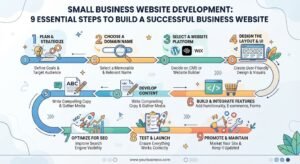
Whether you run a local service company in the United States or a growing business in the United Kingdom, your website should support your actual business goals. You do not necessarily need an expensive website with dozens of features. You need the right features, a clear message, and a reliable foundation.
In this guide, you will learn how to plan a business website, choose a suitable platform, understand development costs, improve search visibility, and turn visitors into potential customers. You will also discover when professional development makes sense and how to avoid common mistakes.
Small business website development is the process of planning, designing, building, testing, and maintaining a website for a small company. It includes the visible parts customers interact with and the technical systems that make those features work. The goal is to create a useful online presence that supports your business objectives.
For example, a plumbing company might need service pages, customer reviews, and a quote request form. A consultant may need a professional portfolio and a booking system. An online retailer will require product pages, payments, and order management. Effective small business website design starts by understanding these different needs.
A typical project includes website planning, page layouts, content preparation, responsive design, functionality, testing, and launch. Depending on your requirements, it may also involve a content management system, analytics, security measures, and search optimization. Each element should serve a purpose rather than add unnecessary complexity.
Website design focuses mainly on appearance, layout, typography, colours, and the overall user experience. Website development makes the design functional through coding, platform configuration, integrations, and technical implementation. Many projects require both disciplines because an attractive website is not useful if its forms, menus, or essential features do not work properly.
Almost any business can benefit from an appropriate website, including consultants, tradespeople, agencies, local shops, professional firms, and startups. The right structure depends on how customers discover and buy your services. A local electrician might prioritize phone calls, while a business selling products online needs a smooth shopping experience.
Your website can become the central place where customers learn about your business. Social media profiles, online directories, and advertising can introduce people to your brand, but your website gives you more control over the information they see. You can explain your services, demonstrate your experience, and make contacting you straightforward.
Professional small business website development also helps you build a consistent customer experience. Visitors should quickly understand what you offer, who you serve, and how to take the next step. When the information is clear and the website works reliably, customers have fewer reasons to leave without exploring your services.
People often assess a business before contacting it. A clear service description, genuine customer reviews, relevant examples, accurate contact details, and consistent branding can make that decision easier. Your website should answer reasonable questions openly. Avoid fake testimonials, exaggerated promises, or claims that you cannot support with evidence.
Yes, a website can help customers discover your business through search engines, referrals, useful articles, and marketing campaigns. Relevant service pages can answer specific questions that potential customers search for online. However, visibility takes work. Your content, technical setup, competition, location, and ongoing marketing all influence the results you achieve.
Social media can help you build relationships and reach new audiences, but you depend on each platform’s rules and features. Your website provides a more controlled place for detailed service information, useful resources, customer enquiries, and business updates. Using both channels together can create a stronger customer journey than relying on either alone.
The cost depends on what you need, who builds the website, and how much customization the project requires. A basic template-based website generally costs less than a custom project with advanced functionality. Your location also matters because professional fees and market expectations differ between the United States and the United Kingdom.
Before requesting quotes, decide what the website must accomplish. List the pages, features, integrations, and support you need. Then compare proposals based on their actual deliverables instead of choosing the lowest price immediately. Published UK pricing guides show a wide range of costs, illustrating why project scope matters more than a single average figure. See a UK small business website cost guide.
The main factors include the number of pages, design complexity, content writing, custom functionality, e-commerce features, integrations, and developer experience. A website with a simple contact form requires less work than one with customer accounts or an appointment system. Hosting, premium software, maintenance, and ongoing marketing can add further expenses.
A basic website usually provides essential information through a template or simple page structure. A professional business website may include tailored layouts, stronger content, conversion-focused pages, and more careful testing. A custom website can support specialized workflows or unique functionality. The best option depends on what your customers need and how your business operates.
In the United States, a small business website may cost a few hundred dollars for a simple DIY setup or several thousand dollars for professional development. More complex projects can cost considerably more. For a useful comparison, request itemized quotes in USD and check whether design, content, hosting, SEO setup, and maintenance are included.
In the United Kingdom, a basic website may cost hundreds of pounds, while a professionally developed website can cost several thousand pounds or more. Custom features and e-commerce increase the potential budget. Request quotes in GBP, check whether VAT applies, and confirm the ongoing charges before agreeing to a project.
Remember to budget for your domain name, hosting, software licences, security updates, backups, and technical maintenance. Some platforms include several services in one subscription, while other arrangements require separate providers. You may also need professional content updates or SEO support. Review recurring charges annually so your website remains affordable as your business grows.
A successful website gives visitors the information they need without making them search through unnecessary pages. Most small companies benefit from a clear homepage, an About page, service or product pages, and a contact page. Depending on the business, you may also need a portfolio, pricing information, FAQs, or customer resources.
Good small business website design also makes important actions easy to find. Visitors should be able to understand your offer, check your credibility, and contact you without confusion. Keep the layout consistent, use readable text, and make sure every important page works on desktop and mobile devices.
Most businesses should begin with a homepage, About page, Services or Products page, and Contact page. Add separate service pages when different offerings require distinct explanations. Include relevant privacy information and other legal pages based on your location, business model, and applicable regulations. Every page should provide a clear benefit to the visitor.
Your homepage should explain what your business does, who it helps, and why customers should consider your services. Use a clear headline, a short explanation, relevant proof of credibility, and a visible call to action. Avoid vague slogans that sound impressive but leave visitors unsure about the actual service you provide.
Contact forms and calls to action help visitors move from reading to taking action. Depending on your business, you might offer a quote request, consultation booking, telephone link, or product purchase button. Ask only for information you genuinely need. Short, accessible forms usually create a simpler experience than lengthy forms with unnecessary questions.
Use genuine testimonials, relevant qualifications, accurate business details, clear policies, and authentic examples of your work. If you have case studies, explain the customer’s problem, your approach, and the outcome you can substantiate. An HTTPS connection is also essential for a secure website experience, although it does not independently prove that a business is trustworthy.
Some companies benefit from appointment booking, online payments, customer portals, quote calculators, or CRM integrations. Online retailers need product listings, checkout functionality, and order management. Choose features according to real customer needs. Adding complex tools without a clear purpose can increase development costs and make the website harder to manage.
Website builders and custom development solve different problems. A builder can help you launch a straightforward website without extensive technical knowledge. Custom development may be more suitable when your business needs specialized functionality, a distinctive user experience, or integrations that standard templates cannot handle well.
There is no universal winner. Your budget, technical skills, available time, and long-term plans should guide the decision. Some businesses can start with a website builder and upgrade later. Others benefit from professional development from the beginning because their website plays a central role in sales or service delivery.
Website builders commonly offer templates, visual editing, hosting options, and tools for managing content. These features can make setup easier for owners who want to handle routine changes themselves. However, review subscription costs, design restrictions, available integrations, export options, and the platform’s ability to support your future requirements.
Custom development becomes attractive when your business needs specific workflows, advanced integrations, tailored layouts, or functionality that standard tools cannot provide efficiently. A developer can plan the website around your requirements rather than forcing every process into a template. However, custom work may involve higher upfront costs and greater technical responsibility.
Website builders can restrict certain customizations and may tie parts of your website to a particular platform. Custom websites can offer more flexibility but may require a larger budget, longer planning, and professional support. Neither approach automatically guarantees better SEO, stronger security, or more customers. The result depends on implementation and ongoing management.
Start by listing your essential features and separating them from optional extras. Consider who will update the website, what integrations you need, and whether your requirements are likely to change. Compare the full cost of ownership rather than the initial price alone. Choose the approach that meets your current needs without creating avoidable limitations.
The best platform is the one that supports your content, customers, budget, and technical requirements. WordPress, Shopify, Wix, and Squarespace all serve different purposes. Before choosing, consider how easy the platform is to manage, how it handles search optimization, and whether it supports the features your business actually needs.
A platform should make it easier to run your business, not create unnecessary work. Review hosting arrangements, backups, security updates, software costs, and options for moving your content. If you plan to expand, make sure the platform can accommodate your likely growth without requiring an expensive rebuild too soon.
WordPress can be a strong option for businesses that need flexible content management, service pages, blogging, and a wide range of extensions. It can support many types of websites, but its quality depends on the theme, plugins, hosting, and implementation. Regular updates, backups, security checks, and careful plugin selection remain important.
Shopify is designed primarily for businesses that sell products online. It provides tools for product management, checkout, orders, and other e-commerce tasks. It may suit retailers that want an integrated selling platform without managing every technical component themselves. Before choosing, compare subscription fees, transaction-related costs, integrations, and the features available for your store.
Wix and Squarespace can work well for businesses that want visual editing and relatively straightforward website management. They may suit consultants, local services, portfolios, and companies with simple content requirements. Compare available templates, forms, integrations, SEO controls, subscription plans, and export limitations before committing to a platform.
Check the total cost, content management experience, security arrangements, mobile performance, SEO controls, and integration options. Find out who owns the domain and how you can access your website files and content. Also consider how easily staff can make updates. A platform should fit your working process rather than complicate it.
Search engine optimization should be considered during planning, not added as an afterthought. An SEO-friendly website has a logical structure, useful page content, descriptive titles, relevant internal links, and a technically accessible foundation. These elements help search engines understand your pages while making the site easier for people to navigate.
Effective small business website development also requires realistic expectations about organic traffic. Publishing a website does not guarantee rankings or immediate enquiries. Your results depend on the usefulness of your content, competition, search intent, website quality, and other factors. Follow Google’s SEO Starter Guide when planning your site’s search foundations.
Organize your pages into clear categories and use descriptive URLs that reflect their purpose. Give every important page a unique title and a useful main heading. Add internal links that help visitors discover related information. Avoid creating multiple pages that target the same intent without offering a meaningful difference.
Start with the services you provide and the questions potential customers ask before making a decision. Research relevant phrases, examine search results, and identify whether people want information, a comparison, or a service provider. Assign each page a clear primary topic. Use related terms naturally instead of repeating the same phrase in every paragraph.
Slow pages, broken links, indexing problems, and difficult navigation can create barriers for users and search engines. Optimize images, avoid unnecessary scripts, use reliable hosting, and ensure important pages can be crawled. Google recommends good Core Web Vitals as part of a strong user experience. You can review its Core Web Vitals guidance for current metrics and recommendations.
Local businesses should provide accurate contact information, describe their service areas honestly, and create useful pages for the locations they genuinely serve. An eligible business can also maintain a Google Business Profile. Avoid producing large numbers of nearly identical city pages that provide little value. Local content should answer real customer questions.
Connect Google Search Console, submit your sitemap when appropriate, and check whether important pages are indexed. Review search queries, clicks, impressions, and technical issues over time. Use analytics to understand meaningful actions such as enquiries or bookings. Improve pages based on evidence rather than making constant changes without a clear reason.
Many customers browse websites on phones, especially when looking for nearby services or trying to contact a company quickly. Your website should adapt to different screen sizes without forcing visitors to zoom, scroll sideways, or struggle with menus. Mobile usability should be part of the initial design rather than a last-minute adjustment.
A responsive website also makes it easier for customers to complete important tasks. They should be able to read service details, tap a telephone number, fill in a form, or complete a purchase comfortably. Test your most important pages on real devices and address the problems that interfere with these actions.
Responsive design allows a website’s layout and content to adapt to different screen sizes. Images resize, columns rearrange, and navigation adjusts to fit available space. The goal is to preserve readability and functionality across devices. A responsive layout should also maintain sensible spacing and prevent important content from becoming difficult to access.
Avoid tiny text, cramped buttons, menus that are difficult to open, intrusive pop-ups, and forms that require unnecessary typing. Large images can also push important information too far down the page. Check that buttons have enough space, text remains readable, and users can complete essential tasks without frustration.
Compress images, use suitable image formats, reduce unnecessary scripts, and avoid loading features that visitors do not need. Keep navigation simple and make key actions easy to reach. Test the website with Google’s PageSpeed Insights and investigate the specific issues it reports rather than assuming every site needs the same fixes.
Open the website on different phones and screen sizes, then test its most important journeys. Try navigating menus, submitting forms, tapping phone links, and completing purchases if available. Check for clipped text, layout shifts, and slow-loading content. Automated testing tools can help, but real-device checks reveal practical problems that reports may miss.
A website that attracts visitors but generates no useful enquiries may not be supporting the business effectively. Lead generation starts with a clear offer and a simple path toward the next action. Your website should help potential customers understand how you can solve their problem and why contacting you is worthwhile.
Focus on relevance instead of filling every page with sales messages. Explain your services in plain language, answer common objections, and provide appropriate proof of experience. Then make the next step clear. For some businesses, that means requesting a quote; for others, it may mean booking a consultation or purchasing a product.
Explain what you offer, who you help, and what makes your service relevant to the customer’s needs. Avoid generic claims such as “the best service in the world” unless you can substantiate them. A clear headline and a short supporting explanation help visitors decide whether they are in the right place.
Place relevant calls to action where visitors have enough information to make a decision. A service page might include a quote request near its main explanation and another after supporting evidence. Use descriptive labels such as “Request a Quote” or “Book a Consultation.” Keep the number of competing actions manageable.
A landing page can focus on one service, audience, or campaign. It should explain the offer, address relevant concerns, provide credible evidence, and guide visitors toward a specific action. Keep unrelated distractions to a minimum. If you run paid advertising, ensure the landing page matches the promise and intent of the advertisement.
Genuine testimonials and relevant case studies can help potential customers understand your experience. Explain the original challenge, the work completed, and any results you can verify. Obtain permission before publishing customer details. Never invent reviews or present illustrative figures as real outcomes because misleading claims can damage trust.
Track meaningful actions such as completed enquiry forms, calls, consultation bookings, and purchases. Set up analytics carefully and respect applicable privacy and consent requirements. Compare conversion rates over time, but consider lead quality as well as quantity. A smaller number of relevant enquiries may be more valuable than many unqualified submissions.
Hiring a professional company can make sense when you need a reliable website but lack the time, skills, or resources to build and maintain it yourself. A capable provider can help turn your business requirements into a clear project plan. However, professional support is not necessary for every simple website.
Before hiring anyone, understand what you are paying for. Ask about deliverables, design revisions, functionality, content, testing, ownership, and support after launch. Review the provider’s relevant experience and communication style. A good working relationship should include clear expectations, realistic timelines, and a shared understanding of your business goals.
A DIY approach may suit a business with a limited budget, straightforward requirements, and someone willing to learn the platform. Website builders can help you publish basic pages and make routine updates. However, remember that your time has value, and you may still need professional help for complex features, accessibility, or technical problems.
Consider hiring a developer when your website needs custom functionality, integrations, a tailored user experience, or a more involved migration. Professional help can also be useful when your current website has persistent technical problems or fails to support your sales process. Define the business problem first so you can evaluate whether the proposed solution addresses it.
Depending on the agreed scope, services may include discovery, planning, design, development, responsive testing, launch preparation, and technical support. Some providers also offer content writing, SEO foundations, or maintenance packages. Confirm which services are included, which cost extra, and what responsibilities remain with your business after launch.
Ask for examples of relevant projects, a written scope, a proposed timeline, and a clear payment schedule. Confirm who owns the domain, website files, content, and accounts. Discuss revisions, backups, security, ongoing maintenance, and how support requests will be handled. Get important agreements in writing before the project begins.
For businesses exploring professional support, XpertCode’s web development services provide a starting point for reviewing available development solutions. Compare the services against your own requirements and request clarification about any feature or deliverable that matters to your project.
The timeline depends on the website’s size, complexity, content readiness, and approval process. A simple website may take a few weeks, while a larger project with custom functionality can take several months. These are broad planning expectations rather than guarantees. Your developer should provide a project-specific schedule after understanding the requirements.
Preparation makes a substantial difference. Delayed content, unclear feedback, and changing requirements can slow progress even when the technical work is straightforward. Decide who will approve designs, gather the necessary materials, and agree on the project’s essential features. A realistic schedule gives both sides time to review and test the website properly.
A typical project begins with discovery and planning, followed by content preparation, design, development, testing, and launch. Some stages overlap, depending on the workflow. Each stage should have clear deliverables and review points. This helps the business understand what is happening and gives the developer a practical way to manage progress.
A simple informational website has fewer moving parts than a site with product management, customer accounts, payment processing, or third-party integrations. Custom functionality also requires additional testing. The timeline should reflect the actual requirements, not just the number of pages. A small website can still be complex if its features involve detailed workflows.
Missing content, slow feedback, unclear requirements, unexpected technical issues, and repeated scope changes can all cause delays. Third-party services may also require additional setup or approval. Reduce these risks by preparing content early, assigning a decision-maker, and documenting agreed changes. If the project scope changes, discuss how the timeline and budget may be affected.
Prepare your business information, logos, images, service descriptions, and customer-facing policies before development begins. Agree on the key features and decide who will approve each stage. Review work promptly and report issues clearly. Keep optional features separate from launch requirements so that useful improvements do not unnecessarily delay the initial release.
A website can look attractive and still perform poorly if it ignores the customer’s needs. Some businesses focus entirely on appearance, while others publish generic content or add features without considering their purpose. These choices can create confusion, increase maintenance costs, and make it harder for visitors to take action.
The best way to avoid these problems is to plan around clear goals and test the actual user experience. Review the website from a customer’s perspective. Can visitors understand your offer, find relevant information, trust what they see, and contact you easily? Fixing these basic issues often matters more than adding decorative effects.
A low quote may be suitable for a straightforward project, but price alone does not reveal what is included. Check whether the proposal covers responsive layouts, essential pages, forms, testing, and ownership. Ask about additional fees and ongoing support. Compare the complete deliverables before deciding which offer provides the best value.
A website that loads slowly or works poorly on phones can make customers abandon important tasks. Test page performance, simplify unnecessary features, and make navigation comfortable on smaller screens. Review real performance data when available. Do not assume that a website works well on mobile simply because it looks acceptable on a desktop computer.
Generic descriptions make it difficult for customers to understand what you actually provide. Explain your services, intended audience, process, and relevant experience in clear language. Give each important page a specific purpose. Review every paragraph and remove statements that add no useful information or repeat the same point without offering further detail.
A website can struggle when search engines cannot access important pages, visitors cannot navigate the interface, or technical updates are ignored. Use descriptive page content, logical navigation, readable contrast, keyboard-friendly controls, secure connections, and regular backups. Review relevant privacy obligations for your audience and business model instead of relying on generic legal templates.
Publishing a website is the beginning of the process, not the end. Without monitoring, you may not know which pages attract enquiries or where visitors encounter problems. Set up appropriate analytics, review relevant search data, and test important forms regularly. Use what you learn to prioritize improvements instead of redesigning everything without evidence.
Choosing a developer is easier when you know how to assess their work. Look beyond attractive screenshots and examine real websites, their mobile experience, functionality, and relevance to your project. A provider who understands your business goals may be more useful than one who offers a long list of technical features without explaining their value.
A strong working relationship also depends on clear communication and transparent agreements. You should understand what will be built, how progress will be reviewed, and what happens after launch. Compare providers using the same requirements so you can evaluate their proposals fairly and identify the best fit for your business.
Review live projects that resemble your business in purpose or complexity. Test their navigation, mobile layouts, forms, and other important features. Look for clear content and consistent usability rather than visual effects alone. Ask what the developer contributed to each project and whether the examples demonstrate the skills your own website requires.
Ask how the developer will approach your requirements, what information they need from you, and how they handle changes. Discuss milestones, feedback, testing, ownership, and post-launch support. Find out who will be your main contact and how progress will be communicated. The answers should be specific enough to help you make an informed decision.
Compare proposals against the same project brief. Check page counts, functionality, content responsibilities, integrations, testing, revisions, launch support, and recurring fees. Confirm whether prices include taxes where applicable. A lower quote may exclude important work, while a higher quote may include services you do not need. Ask for clarification before making your decision.
Be cautious about vague contracts, unclear ownership, unexplained fees, poor communication, and promises of guaranteed Google rankings. A professional provider should explain what they can control and what depends on external factors. Check references where appropriate, read the agreement carefully, and avoid paying for undefined deliverables that you cannot assess.
A good developer should ask about your customers, services, competitors, budget, and business goals before recommending a solution. They should be able to explain technical choices in plain English and connect those choices to practical needs. If the discussion focuses only on colours or features, important questions about usability and business outcomes may be missing.
Choosing a website involves practical questions about cost, technical skills, page count, platforms, and customer acquisition. The answers below provide a starting point, but your final decisions should reflect your business model, budget, and audience. A simple service website and a growing online store will not have exactly the same requirements.
A small business website can cost a few hundred dollars or pounds for a simple DIY setup and several thousand for professional development. Complex features may increase the price significantly. Ask for an itemized quote and budget separately for hosting, domain renewal, maintenance, content, and other ongoing expenses.
Yes. Website builders and content management systems allow many business owners to create websites without writing code. Templates and visual editors make basic tasks easier, although you may still need help with advanced functionality, integrations, accessibility, or technical troubleshooting. Choose a platform that matches your skills and future requirements.
There is no fixed number. Many businesses can start with a homepage, About page, Services or Products page, and Contact page. Add dedicated service pages, case studies, FAQs, or location pages when they provide useful information. Each page should serve a clear purpose instead of existing only to increase the page count.
WordPress can be a good choice because it offers flexible content management and supports many types of business websites. It is useful for companies that want to publish articles and expand their pages over time. However, you must manage hosting, updates, backups, security, and plugin quality or arrange suitable professional support.
Create useful pages that match what your customers are searching for, make the website easy to use on mobile devices, and explain your services clearly. Use relevant SEO, appropriate local marketing, genuine proof of credibility, and visible calls to action. Track enquiries and improve the pages that help visitors become customers.
A successful website begins with a clear understanding of your business and customers. Choose a suitable platform, plan the essential pages, write useful content, and make every important action easy to complete. Pay attention to mobile usability, accessibility, security, and search optimization from the beginning rather than treating them as optional extras.
Remember that small business website development is not simply about launching a collection of pages. It is about building a practical online resource that supports your business today and can adapt as your needs change. Monitor performance after launch, listen to customer feedback, and improve the website based on evidence.
If you need professional support, explore XpertCode’s web development services to learn more about website development options. Before starting a project, discuss your goals, required features, budget, and timeline so the proposed solution fits your business.