Close
Xpertcodes – Where Expertise Meets Innovation | Code | Consult | Expert
Your website may be costing your business customers without you noticing. Visitors might leave because pages load slowly, information is hard to find, or the design feels outdated. Some people may even choose a competitor because that website makes the next step easier.

A website redesign for small business owners should solve real problems, not just change colors and pictures. The goal is to improve trust, usability, search visibility, and enquiries. In this guide, you will learn the seven warning signs, compare redesigning with building a new website, understand costs, and discover how to protect your Google rankings during the process.
A website redesign improves an existing website. It may change the layout, colors, page structure, content, navigation, and features. The website can keep its current domain, platform, and useful content. This option often makes sense when the foundation still works but the experience needs improvement. A focused redesign can also improve professional website design without replacing everything.
A new website starts with a fresh build or a major technical rebuild. This may be necessary when the current platform is outdated, important features no longer work, or the website cannot support your business plans. Before deciding to rebuild an existing website, review its performance, content, technical limits, and search traffic. A new build is not automatically better. The right choice depends on what your business needs.
| Factor | Website redesign | New website or full rebuild |
|---|---|---|
| Main purpose | Improve the existing website | Replace the old foundation |
| Existing content | Often retained and improved | Reviewed, rewritten, or migrated |
| Platform | Usually stays the same | May change |
| Development work | Depends on the problems | Often more extensive |
| SEO risk | Can occur if URLs or content change | Can be higher during migration |
| Best section | When the current site still works | When the existing system blocks growth |
The signs your business website needs an update are not always obvious. A website can look acceptable and still lose potential customers. Check what happens when real visitors use it. Can they understand your services, find answers, and contact you without confusion? These details matter more than personal opinions about colors or design trends.

These 7 warning signs can help you decide where to start. One problem may only need a small fix. Several problems together may point to a larger project. Review your website on a phone and computer, study your analytics, and ask customers about their experience before making a decision.
Your website often shapes a visitor’s first impression of your business. An outdated website design can make a company appear inactive, even when its services are excellent. Old photographs, broken layouts, inconsistent fonts, and unclear service information can weaken trust. Your website appearance should match the quality of the work you deliver. It should also explain what makes your business different. If the design no longer reflects your brand, consider a focused refresh or a complete redesign.
Many customers browse websites on smartphones. A page that looks good on a desktop may become difficult to use on a smaller screen. Text may be too small, buttons may sit too close together, and forms may require unnecessary scrolling. Responsive web design helps a page adjust to different screen sizes. A mobile-friendly website should make reading, navigation, and contact actions simple. Test important pages on real phones, not only inside a desktop preview. Good mobile responsiveness helps visitors complete tasks with less frustration.
A slow website can interrupt the buying process before a visitor sees your offer. Large images, unnecessary scripts, weak hosting, and poorly configured plugins can increase loading time. Website loading speed matters because people expect pages to respond quickly. Start by testing important pages with Google PageSpeed Insights. Review the results instead of guessing what causes the delay. Better website performance optimization may involve compressing images, reducing unused code, improving hosting, and limiting heavy third-party tools. Fix the main causes before investing in decorative changes.
Traffic alone does not prove that your website is working well. Visitors may arrive from Google but leave without calling, submitting a form, or purchasing anything. If your website is not converting visitors, check whether the offer is clear and the next step is easy to find. Conversion rate optimization helps you understand and remove barriers that stop people from acting. Place useful call-to-action buttons where they make sense. Explain your services clearly, answer common questions, and reduce unnecessary form fields. Track leads and sales to measure whether changes improve results.
A website can look attractive but still struggle in search results. Search engines need to understand its pages, content, links, and technical setup. Weak headings, duplicate pages, broken links, and poor internal linking can limit search engine visibility. Review your organic website traffic and important landing pages in Google Search Console. A technical SEO audit can uncover crawl problems, indexing issues, and redirect errors. A website redesign for small business growth should preserve useful content and improve its structure. Do not remove pages simply because they look old.
Your team should not need a developer for every small content change. If updating service details, publishing a blog post, or changing a phone number feels difficult, your setup may be holding you back. A suitable content management system allows authorised users to update content without rebuilding pages. The system should also support sensible permissions, backups, and safe updates. Review your publishing process and identify repeated problems. Sometimes better training or a few technical fixes are enough. In other cases, a different platform may make long-term website maintenance much easier.
Your business may have added new services, locations, products, or customer groups since the website was built. The old structure may no longer explain your full offer. It might also lack booking tools, payment features, customer portals, or connections to other business systems. This is where website functionality becomes important. A good website should support your next stage of growth without becoming unnecessarily complex. Review your plans for the next two or three years. If the current platform cannot support those plans safely and efficiently, a deeper rebuild may be the practical choice.
The choice between website redesign vs new website depends on the condition of your current site. If its platform works, its URLs perform well, and its features meet your needs, improving the existing site may be enough. You can update layouts, improve service pages, fix mobile problems, and make contact options clearer. This approach can protect useful assets while addressing the problems visitors face.
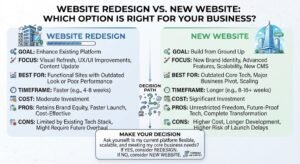
A new build may be more suitable when the current system is insecure, difficult to maintain, or unable to support essential features. Before making the decision, list your requirements and separate must-have features from nice-to-have ideas. Ask developers to explain what can be repaired, what should be replaced, and why. For many businesses, a website redesign project plan prevents unnecessary work and keeps the budget focused on real needs.
| Your situation | Practical option | Reason |
|---|---|---|
| The design feels old, but the site works | Visual refresh or redesign | The foundation may still be useful |
| Pages are confusing and leads are low | Redesign with conversion improvements | The user journey needs attention |
| The platform cannot support key features | Rebuild or platform migration | The technical limits affect growth |
| The site has serious security problems | Technical review and possible rebuild | Security must come before appearance |
| Search traffic is valuable | Carefully planned redesign | Existing SEO assets need protection |
The website redesign pricing depends on page count, design complexity, content work, platform, integrations, and SEO needs. A simple refresh costs less than rebuilding an online store or a custom business portal. Published US pricing guides show wide ranges because providers include different services in their quotes. For example, Suff Digital’s 2026 guide lists different price bands by project size. Treat these as estimates, not fixed market prices.
For a website redesign for small business owners, the most useful quote explains what is included and what costs extra. Ask about design, development, copywriting, migration, testing, hosting, and ongoing support. If your company operates in Pakistan, request local quotes in PKR and compare the scope carefully. A low quote may exclude important work. A higher quote may include strategy, custom features, and SEO protection. Compare deliverables, not just the final number.
| Project type | Indicative US pricing | Common scope |
|---|---|---|
| Basic visual refresh | $3,500–$8,000 | New styling and limited page updates |
| Small custom business website | $8,000–$18,000 | Custom layouts, CMS, and basic SEO work |
| Mid-size business website | $18,000–$40,000 | More pages, content work, and integrations |
| Large or ecommerce website | $40,000–$120,000+ | Complex features, product pages, and custom workflows |
These ranges are indicative examples from a published pricing guide, not a universal quote. Actual prices vary by provider, country, project scope, and exchange rates.
A redesign can improve SEO when it makes pages faster, content clearer, and site structure easier to understand. It can also harm performance if useful pages disappear, URLs change without redirects, or important content becomes difficult to crawl. That is why how to keep Google rankings after redesign should be part of the project from the start. Do not treat SEO as a task that begins after launch.
Before changing the site, record your main landing pages, rankings, organic clicks, impressions, and backlinks where possible. Keep valuable URLs when there is no strong reason to change them. If URLs must change, map each old page to its closest relevant new page and set up suitable 301 redirects. Follow Google’s site migration guidance and its advice on redirects. After launch, check indexing, errors, traffic, and page performance.
Use this SEO checklist for website redesign to protect existing search value. It covers the key steps before and after launch. Each item should have a clear owner, especially on a larger site. Do not assume that a developer will automatically handle SEO unless the project scope says so.
| Check | Before launch | After launch |
|---|---|---|
| Important URLs | Record existing URLs | Test new and retained URLs |
| Redirects | Prepare the URL map | Check every redirect |
| Metadata | Save titles and descriptions | Review updated metadata |
| Content | Identify pages worth keeping | Check content and internal links |
| Indexing | Review crawl and index status | Check robots rules and canonical tags |
| Sitemap | Prepare the correct sitemap | Submit the updated sitemap |
| Performance | Test key page templates | Recheck speed and usability |
| Analytics | Record current performance | Confirm tracking still works |
Protect your most useful pages first. Keep content that answers customer questions and already earns traffic. If a page needs improvement, strengthen it rather than removing it without a plan. Make sure internal links point to the correct destinations. Review canonical tags, index settings, and XML sitemaps before launch. If the domain or URL structure changes, follow Google’s official migration steps.
Once the new website is live, use Google Search Console to inspect key URLs and monitor clicks, impressions, indexing, and errors. Some movement in search results can happen while Google recrawls the site. Do not respond to every short-term change by making several new edits at once. Compare performance with your baseline and investigate lasting problems. Google’s SEO Starter Guide offers a useful foundation for maintaining clear, accessible pages.
Good website redesign best practices start with a clear reason for making changes. Decide what the current website fails to do and what the new version must achieve. Your goals may include more qualified enquiries, better mobile usability, improved page speed, or easier content updates. Give each goal a way to measure progress. This makes the project more useful than a simple visual update.
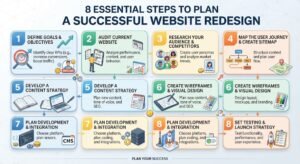
A written website redesign project plan helps the business owner, designer, developer, and content team work toward the same result. It should cover scope, responsibilities, deadlines, budget, content, SEO, testing, and launch. Keep decisions documented and review progress regularly. This reduces misunderstandings and helps the team identify problems before they become expensive.
Start with a full review of your existing pages. Check traffic, enquiries, loading speed, mobile usability, broken links, and outdated information. Speak to customers or staff who use the website regularly. Their feedback may reveal problems that analytics cannot explain. Keep a record of pages that perform well so you do not remove useful assets during the redesign.
Choose goals that support business results. You may want more phone calls, quote requests, appointments, or online purchases. Record the current results before work begins. Then set realistic targets and decide how you will measure them. Clear goals help your team choose features that matter instead of adding functions simply because competitors use them.
Your website should answer the questions your customers actually ask. Find out what they need, what concerns them, and what information helps them decide. Use this research to guide your website content strategy. Service pages should explain the offer, process, benefits, and next step. Avoid vague claims that could describe any business.
Plan your main pages before designing the new layouts. Group related services and give each important topic a clear destination. A logical website architecture helps visitors understand where they are and where to go next. Good website navigation should use clear labels and avoid unnecessary menu layers. Keep the most important actions easy to find.
Design for small screens as well as desktops. Make text readable, buttons easy to tap, and forms simple to complete. Check that images fit the screen and do not push important information out of view. A strong mobile layout supports a smoother website user experience (UX). It should help visitors complete tasks without zooming or horizontal scrolling.
Test the site with real devices and common browsers. Compress large images, remove unnecessary scripts, and check forms. Review Core Web Vitals alongside broader performance results. Also check website accessibility, including readable contrast, keyboard use, form labels, and useful alternative text. Review website security through software updates, access controls, backups, and secure connections.
Review every important page before moving it. Update weak copy, check facts, and remove outdated details. Preserve useful page titles, descriptions, headings, and internal links where appropriate. Prepare redirects for changed URLs and check that the new site can be crawled. A website content strategy should support users and search intent, not simply fill empty page templates.
Test forms, phone links, email links, checkout steps, navigation, and other important features. Review the site on mobile and desktop. Check for broken pages, incorrect redirects, and tracking errors. After launch, monitor the site closely and fix problems quickly. A redesign is not finished when the website goes live. It is finished when the main user journeys work as intended.
Common website redesign mistakes often begin with focusing on appearance instead of business needs. A modern look cannot fix unclear service pages, broken forms, or poor navigation by itself. Another mistake is copying a competitor without understanding why customers choose your business. Your site should reflect your own offer, strengths, and audience. Keep each design choice connected to a real user need.
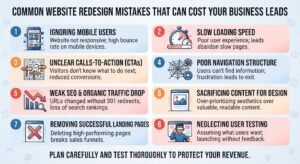
Other problems include removing useful content, changing URLs without redirects, skipping mobile tests, and launching without working analytics. Businesses may also underestimate content writing, accessibility, and maintenance. These gaps can reduce trust and make it difficult to measure results. A clear plan, careful testing, and a named project owner can prevent many avoidable issues.
| Mistake | Why it causes problems | Better approach |
|---|---|---|
| Choosing design before goals | The site may look better but perform poorly | Define business goals first |
| Removing pages without review | Useful search traffic may be lost | Review page value and intent |
| Ignoring mobile users | Visitors may struggle to act | Test real phones and screen sizes |
| Skipping redirect planning | Old URLs may return errors | Map URLs and test redirects |
| Launching without testing | Forms or features may fail | Test key journeys before launch |
| Forgetting maintenance | Problems may return over time | Plan updates and monitoring |
Before work starts, create a list of existing pages, images, downloadable files, and important URLs. Record which pages receive organic traffic, generate leads, or attract links from other websites. Keep copies of valuable content and metadata. This gives your team a reliable reference during the redesign. It also reduces the chance of deleting information that customers or search engines still need.
Make a content decision for each important page: keep it, improve it, combine it, or remove it. If you combine pages, choose the most relevant destination and redirect old URLs where needed. Avoid sending every removed page to the homepage. Google’s site migration documentation explains why URL mapping and relevant redirects matter. After launch, check internal links and confirm that important content remains accessible.
Consider whether your team has the time and skills to manage design, development, content, testing, and SEO protection. A small visual update may be manageable in-house. A complex rebuild, ecommerce project, or platform migration often needs broader technical support. When you hire a web development company, look for a team that understands both the website and the business goals behind it.
Ask potential providers to explain their process, project scope, testing approach, and support after launch. Review relevant portfolio examples and speak with past clients if possible. Make sure the proposal explains who handles content, redirects, analytics, security, and maintenance. XpertCodes offers web development services that you can review when comparing providers. Choose a partner based on relevant experience, clear communication, and the work included in the agreement.
When you choose a website redesign company, do not judge it by screenshots alone. Ask how it researches users, plans page structure, improves speed, and protects existing SEO value. Request a written scope with deliverables, milestones, revision limits, and ownership terms. The provider should explain technical choices in language you understand. You should know who will manage the project and who to contact when a problem appears.
A useful proposal also explains what happens after launch. Ask whether the team provides training, backups, software updates, monitoring, and ongoing support. Check that you will retain access to your domain, hosting, analytics, and website files. A reliable partner will discuss risks honestly instead of promising instant rankings. If you need broader functionality, ask how the proposed solution can support future growth without creating unnecessary complexity.
These FAQs answer common questions from business owners who are planning an upgrade. The right choice depends on the condition of your current website, your budget, and your goals. Review your data before making a final decision. A redesign should solve clear problems and give customers a better way to interact with your business.
There is no single timeline or price that fits every project. A small visual refresh differs greatly from a custom rebuild or online store migration. Use the answers below as a starting point, then ask providers to explain how their estimates match your requirements. Keep SEO, accessibility, security, and future maintenance in the plan.
There is no fixed schedule that every business must follow. Review the site regularly and redesign it when its design, performance, content, or features no longer meet customer needs. A business may need a small update sooner than a full redesign. Focus on evidence, not age alone.
A redesign may be enough when the current platform works and supports your needs. A new build may be better when the site has major technical limits, security problems, or missing features. Compare the cost and risks of both options before deciding.
Yes, a redesign can support SEO by improving page structure, speed, content, mobile usability, and internal links. However, rankings are not guaranteed to improve. Removing useful pages or mishandling redirects can cause problems. Protect existing SEO assets and monitor results after launch.
A simple refresh may take a few weeks, while a custom website can take several weeks or longer. Content approval, new features, integrations, and migration work can extend the timeline. Ask for a project schedule with milestones, testing time, and a launch plan.
Check relevant experience, project scope, communication, testing, ownership terms, and post-launch support. Ask how the provider handles SEO, redirects, security, and backups. Compare proposals by deliverables rather than price alone. Make sure the agreement clearly explains responsibilities and extra costs.
A website should help people understand your offer, trust your business, and take the next step. If it looks outdated, performs poorly on mobile, or fails to generate enquiries, start by finding the cause. The right small business website improvements may be simple. Other problems may require a deeper redesign or a new technical foundation. Choose the approach that solves the real issue.
A carefully planned website redesign for small business growth should support customers and your long-term goals. Set clear targets, protect useful content, test every important feature, and monitor results after launch. Strong website design for business growth is not just about appearance. It connects a clear message, reliable performance, useful content, and simple actions. Start with an honest review of your current site, then build a practical plan for what comes next.