Close
Xpertcodes – Where Expertise Meets Innovation | Code | Consult | Expert
The web has changed dramatically. A website can no longer survive on attractive colors and a contact form alone. Your customers expect speed, security, easy navigation, mobile usability, and a smooth buying experience from the first click.
That’s where modern web development comes in. It combines thoughtful design, efficient code, strong security, smart architecture, accessibility, and search visibility. In 2026, successful websites also need to work well with AI-powered workflows and increasingly complex digital services.
For businesses in the USA and UK, this shift matters even more. Competition is fierce, customer expectations are high, and every slow page can become a missed opportunity. A modern website should feel less like a digital brochure and more like a reliable business engine.
A great website doesn’t simply look modern. It makes every customer interaction feel easier.
At its core, modern web development 2026 means building websites around performance, security, accessibility, scalability, and user experience. Developers now combine frontend and backend systems with APIs, cloud infrastructure, automation, and intelligent tools. The goal is simple: create digital experiences that remain useful as your business grows.
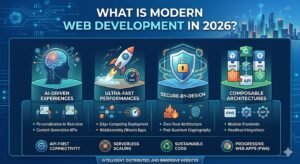
Unlike older approaches, modern website development treats the website as a complete system. Its architecture, content, database, security controls, and interface must work together. Current development discussions increasingly emphasize AI-assisted workflows, server-first approaches, accessibility, and resilient architecture rather than chasing one fashionable framework.
| Area | Modern approach |
| Performance | Fast loading and efficient rendering |
| Security | Secure architecture from the beginning |
| Design | Responsive and accessible interfaces |
| SEO | Crawlable structure and strong page experience |
| Architecture | Modular and scalable systems |
| Development | Automation, testing, and AI assistance |
| Growth | Infrastructure prepared for changing demand |
A basic website might display your company name, services, address, and phone number. That can work for a small operation with limited digital needs. However, growing businesses need much more. Customers now expect high-converting websites that answer questions quickly and guide them toward useful actions.
Consider a US consulting company with an outdated site. The pages look fine on desktop, yet the mobile menu breaks and the contact form takes eight seconds to load. A competitor with professional web development can offer a smoother journey and win the same customer before the first company gets a chance.
A modern business site can connect marketing, sales, support, analytics, payments, customer systems, and content. That makes business website development more strategic than simply publishing pages. Your website becomes part of the operating system behind the business.
AI is reshaping how developers build websites. Artificial intelligence in web development can help with code suggestions, debugging, testing, documentation, prototypes, and repetitive development tasks. This doesn’t mean developers disappear. Instead, skilled developers can spend more time solving architecture and product problems.
The biggest shift comes from AI coding assistants and AI-assisted coding workflows. Developers can move faster when they review generated code carefully. Security still matters, though. AI can produce incorrect logic, outdated patterns, or vulnerable dependencies. Professional teams therefore combine AI speed with testing, code review, and human judgment.
| AI use | Practical benefit |
| Code assistance | Faster development |
| Debugging | Quicker issue discovery |
| Prototyping | Faster idea validation |
| Testing support | Broader test coverage |
| Documentation | Easier project maintenance |
| Personalization | More relevant user experiences |
Recent 2026 development coverage also highlights AI-assisted workflows alongside server-first architectures and stronger engineering practices. The important lesson isn’t “let AI build everything.” It’s “use AI where it improves the workflow without surrendering technical control.”
Speed is no longer a decorative technical metric. It directly shapes how people experience your business. When pages respond quickly, visitors can browse naturally. When every interaction feels sluggish, frustration builds quickly. Website performance optimization therefore belongs inside the development process rather than at the end.
Developers can improve web performance optimization through smaller assets, efficient JavaScript, image optimization, caching, CDNs, and better server architecture. They also need to measure real users instead of trusting one desktop test. A fast laptop on a perfect connection can hide problems experienced by ordinary mobile visitors.
Imagine two ecommerce stores selling identical products. One opens quickly and responds instantly to taps. The other makes shoppers wait after every action. The difference isn’t merely technical. It changes confidence, engagement, and the likelihood that someone completes checkout.
Google’s Core Web Vitals measure loading performance, responsiveness, and visual stability. The current metrics are Largest Contentful Paint, Interaction to Next Paint, and Cumulative Layout Shift. Google recommends aiming for LCP within 2.5 seconds, INP below 200 milliseconds, and CLS below 0.1.
These measurements help developers see what real users experience. LCP focuses on the main loading moment. INP measures interaction responsiveness. CLS measures unexpected movement on the page. Together, they reveal whether your website feels fast, stable, and responsive instead of merely looking fast in a screenshot.
| Metric | What it measures | Good target |
| LCP | Main content loading | ≤ 2.5 seconds |
| INP | Interaction responsiveness | ≤ 200 ms |
| CLS | Visual stability | ≤ 0.1 |
Google also makes an important distinction: good Core Web Vitals don’t guarantee top rankings. Search systems consider many signals. Still, Google recommends good Core Web Vitals because they support better user experiences and align with successful search performance.
Your customers don’t experience websites through one screen anymore. They move between phones, tablets, laptops, and larger displays. Mobile-first web development starts with the smallest practical experience and expands it for larger screens. This approach forces developers to prioritize essential content instead of hiding poor decisions behind a large monitor.
Strong responsive design also improves usability across different devices. Buttons need comfortable touch areas. Text needs readable sizing. Images should adapt without wasting bandwidth. Navigation should remain understandable. When these pieces work together, mobile-first design becomes more than a visual technique. It becomes a practical usability strategy.
A useful test is simple. Open your website on a phone and try completing its main task with one hand. If finding a service, submitting a form, or buying something feels awkward, the development needs another pass.
Security should begin before the first production deployment. Secure web development builds protection into architecture, code, authentication, dependencies, and infrastructure. Developers need to consider how users authenticate, what data they can access, and what happens when someone sends unexpected input.
Modern teams also consider web application security, secure coding practices, and dependency security throughout the development lifecycle. Stronger projects may use content security policies, controlled permissions, encryption, logging, and regular vulnerability reviews. OWASP guidance can also help teams recognize common application security risks.
| Security layer | Development focus |
| Identity | Authentication and authorization |
| Application | Input validation and secure logic |
| Browser | Content Security Policy and secure headers |
| Dependencies | Software supply-chain security |
| Data | Encryption and data protection |
| Infrastructure | Secure cloud configuration |
Security becomes especially important when websites connect with payment systems, customer databases, CRMs, or third-party APIs. One weak component can create a much larger exposure. Good development therefore treats security as an ongoing discipline rather than a final checklist.
A fast website isn’t automatically a scalable website. Your system also needs to handle growing traffic, larger datasets, new features, and unexpected demand. Scalable web development uses architecture that can expand without forcing developers to rebuild everything whenever the business grows.
That often means modular architecture, scalable architecture, efficient databases, caching, monitoring, and suitable cloud infrastructure. Teams may also use cloud-native development, automated deployment, and load distribution when the project requires them. The right architecture depends on traffic, functionality, budget, and future plans.
| Requirement | Useful development approach |
| Faster delivery | Caching and optimized assets |
| Traffic growth | Scalable infrastructure |
| Reliability | Monitoring and redundancy |
| Easier updates | Modular architecture |
| Global users | CDN and edge delivery |
| Growing features | Reusable components |
Think of architecture like a building’s foundation. You don’t need a skyscraper foundation for a garden shed. However, building a skyscraper on a weak foundation creates trouble later. Smart web development architecture gives your business enough room to grow without paying for unnecessary complexity.
A strong website needs more than attractive pages. Its foundation should support scalable architecture, efficient code, reliable hosting, and fast content delivery. Developers now combine caching, CDNs, optimized databases, and reusable components to keep websites responsive as traffic grows.

Reliability also depends on disciplined development practices. Automated testing, version control, monitoring, and CI/CD pipelines reduce deployment errors. With cloud infrastructure and modern DevOps methods, your website can handle sudden traffic without turning every traffic spike into a technical fire drill.
| Technical area | Business benefit |
| CDN | Delivers content faster |
| Caching | Reduces server workload |
| Code splitting | Loads only required code |
| Database optimization | Improves response times |
| Automated testing | Reduces production bugs |
| CI/CD | Makes deployments safer |
The rendering method affects speed, SEO, and user experience. Server-side rendering creates HTML on the server before sending it to the browser. Client-side rendering sends more work to the browser, which then builds the interface using JavaScript.
Neither approach wins every project. Hybrid rendering often provides the better balance for modern applications. Frameworks such as Next.js can render different pages using different strategies, depending on content freshness, interaction requirements, and performance goals.
| Rendering method | Best suited for |
| SSR | Content-heavy websites |
| CSR | Highly interactive applications |
| Static rendering | Stable marketing pages |
| Hybrid rendering | Complex modern websites |
Modern websites increasingly separate their interface from the systems that provide content. API-first architecture allows websites, mobile apps, dashboards, and other platforms to access the same backend services. This approach gives businesses more flexibility when expanding their digital products.
Headless architecture can also simplify large projects. A website might use one content platform while another application consumes the same data through REST or GraphQL APIs. This separation supports reusable components and makes future redesigns less disruptive.
Accessibility shouldn’t be treated as a final inspection before launch. Developers can build accessible web design directly into components, navigation, forms, colors, headings, and interactive controls. That approach helps more people use your website comfortably across different devices and assistive technologies.
WCAG 2.2 provides internationally recognized guidance for accessible web content. Its principles focus on making interfaces perceivable, operable, understandable, and robust. Important areas include keyboard accessibility, readable content, focus behavior, and compatibility with assistive technologies.
| Accessibility area | What developers should consider |
| Navigation | Keyboard-friendly controls |
| Images | Useful alternative text |
| Forms | Clear labels and instructions |
| Focus | Visible and logical focus states |
| Structure | Semantic HTML |
| Compatibility | Screen reader support |
A beautiful interface won’t rescue a confusing website. UX and frontend development must work together so visitors can understand the page, trust the business, and complete important actions without unnecessary friction. Every interaction should move naturally toward the user’s intended goal.
For example, an ecommerce website may lose sales because checkout requires too many steps. A service website may lose leads because its contact form feels intimidating. Good responsive design connects visual hierarchy with technical performance, creating smoother paths from landing page to conversion.
Technology choices should follow business requirements rather than fashion. TypeScript development, React, Next.js, modern JavaScript frameworks, and full-stack frameworks are widely useful for complex websites and applications. However, a simpler technology stack can still outperform an elaborate one when the project doesn’t need extra complexity.
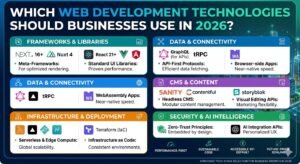
The right stack should also support long-term maintenance. Developers should consider browser compatibility, testing, security, hosting, team skills, and future integrations before choosing technologies. Current development guidance increasingly emphasizes TypeScript, full-stack frameworks, performance, accessibility, automated testing, and secure dependency management.
| Technology or approach | Common use |
| TypeScript | Safer large-scale JavaScript projects |
| React | Interactive frontend interfaces |
| Next.js | Full-stack and hybrid applications |
| Node.js | Server-side JavaScript |
| REST APIs | System integrations |
| GraphQL | Flexible data querying |
| Git | Version control |
| CI/CD | Automated delivery |
SEO begins before your first page reaches Google. Technical SEO depends on clean architecture, crawlable content, responsive layouts, fast loading, logical URLs, and accessible HTML. Developers therefore influence search visibility through decisions that happen long before an SEO specialist edits metadata.
Performance also matters because Google uses page experience signals alongside many other ranking systems. Core Web Vitals measure loading, responsiveness, and visual stability. Good scores can support a better experience, although they don’t guarantee top rankings by themselves.
| Development decision | SEO impact |
| Semantic HTML | Helps structure content |
| Fast rendering | Improves user experience |
| Mobile-first design | Supports mobile usability |
| Clean URLs | Improves page organization |
| Structured data | Helps search engines understand content |
| Internal linking | Connects related pages |
A website should grow with your company instead of becoming a technical bottleneck. Modular architecture makes this easier by separating major functions into manageable components. Developers can then add features without rewriting unrelated parts of the application.
Scalability also involves infrastructure decisions. Cloud hosting, databases, caching, CDNs, monitoring, and automated deployments can help your platform handle growth. A thoughtful cloud-native development strategy becomes particularly valuable when traffic, transactions, integrations, or application complexity increases.
Some websites fail because developers focus heavily on appearance while ignoring technical fundamentals. Oversized images, excessive JavaScript, poor hosting, weak security, confusing navigation, and untested third-party dependencies can quietly damage performance and trust. These problems often become expensive after launch.
Another common mistake is building without a maintenance plan. Dependency security, backups, monitoring, updates, and testing should remain part of the development lifecycle. Developers should also avoid adding unnecessary plugins, libraries, and features simply because they’re fashionable.
| Common mistake | Possible consequence |
| Unoptimized images | Slow page loading |
| Excessive JavaScript | Poor responsiveness |
| Weak authentication | Security exposure |
| No automated testing | More production bugs |
| Poor mobile design | Lost mobile users |
| Outdated dependencies | Greater security risk |
Website cost depends heavily on complexity, design requirements, integrations, content volume, and maintenance. A small business website may require a relatively modest investment, while a custom application with dashboards, APIs, authentication, and complex workflows can cost substantially more.
Instead of choosing the cheapest quote, compare what each development package actually includes. Custom web development may cost more initially, yet a well-built platform can reduce redesigns and technical debt. For businesses, the better question isn’t simply “What does it cost?” but “What value should it create?”
| Website type | Typical complexity |
| Small business website | Low |
| Professional service website | Low to medium |
| Ecommerce platform | Medium to high |
| Custom web application | High |
| Enterprise platform | Very high |
The right development partner should understand your business objective before discussing frameworks. Ask how the team approaches architecture, security, accessibility, performance, testing, SEO, and post-launch maintenance. A company that only talks about design may overlook critical engineering requirements.
You should also examine previous work and communication practices. Clear milestones, realistic timelines, documented requirements, and transparent maintenance plans reduce uncertainty. For businesses seeking professional website development, technical capability matters just as much as creative execution.
Traditional website development often focused on creating pages that looked good and worked on desktop browsers. Today’s expectations are broader. Businesses need responsive web development, strong security, fast interactions, accessibility, analytics, integrations, and systems that can evolve as customer expectations change.
The difference becomes clearer with complex projects. A traditional brochure website might remain mostly static, while a modern platform could connect CRM systems, payment providers, analytics tools, AI services, and internal databases. Architecture therefore becomes a business decision rather than merely a developer preference.
| Traditional approach | Modern approach |
| Page-focused | Experience-focused |
| Desktop-first | Mobile-first |
| Limited integrations | API-driven |
| Manual deployment | CI/CD workflows |
| Basic security | Layered security |
| Fixed structure | Modular architecture |
| Minimal testing | Automated testing |
The next phase will likely combine human developers with increasingly capable AI systems. AI-assisted web development can accelerate coding, testing, debugging, documentation, and prototyping. Yet developers still need judgment because generated code can contain performance, security, accessibility, or architectural problems.
Meanwhile, server-first approaches, edge computing, component-driven interfaces, and AI-powered experiences continue gaining attention. Industry discussions in 2026 also highlight agentic interfaces, cloud-edge architectures, and increasingly integrated development workflows.
The winners won’t necessarily be the websites using the most technology. They’ll be the ones using the right technology with restraint, clarity, and purpose.
Choosing the right development approach can feel complicated when every framework claims to be revolutionary. These common questions explain the fundamentals in simple terms, so you can make better decisions before starting a website project.
Modern web development combines frontend, backend, performance, security, accessibility, SEO, and scalable architecture. It focuses on creating fast, reliable, secure, and useful digital experiences rather than simply publishing attractive web pages.
Major trends include AI-assisted coding, server-first rendering, TypeScript, full-stack frameworks, edge computing, component-driven development, stronger accessibility, and API-first architecture. Performance and security remain equally important.
AI can help developers generate code, explain errors, create tests, document functions, and prototype interfaces. However, human review remains essential because generated code can introduce subtle security or architectural problems.
Developers can improve speed through image optimization, caching, code splitting, CDN delivery, efficient JavaScript, server-side rendering, and better hosting. Core Web Vitals provide useful measurements for loading, responsiveness, and visual stability.
Security should begin during architecture rather than after launch. Developers can use secure coding practices, strong authentication, authorization controls, dependency monitoring, content security policies, and OWASP-aligned processes to reduce common risks.
Yes. Mobile-first development forces teams to prioritize essential content and interactions on smaller screens. Responsive layouts can then expand naturally toward tablets, laptops, and larger displays.
Development affects crawlability, page speed, mobile usability, rendering, structured data, internal linking, and accessibility. Technical decisions can therefore support or restrict how effectively search engines understand and deliver your pages.
There isn’t one universal price. Costs depend on design complexity, functionality, integrations, content requirements, hosting, security, and ongoing maintenance. A simple business site costs far less than a custom enterprise application.
Look for a team that can explain architecture, performance, security, accessibility, SEO, testing, and maintenance clearly. Review relevant projects and ask how the company will measure success after launch.
A successful website in 2026 must do more than exist online. It needs speed, security, accessibility, strong UX, search visibility, and room to grow. High-performance websites achieve these goals by connecting thoughtful design with disciplined engineering.
If your business needs a platform built around real goals, Xpertcode provides Web Development, UI/UX Design, and SEO Optimization services. You can explore the company’s development approach through its official service pages. Xpertcode Web Development Services
For businesses planning a complete digital presence, the strongest approach connects development, design, and search strategy from the beginning. That combination can turn a website from a simple online brochure into a genuine growth engine.
| Topic | Read More |
|---|---|
| Web Development Services | Professional Web Development Services by Xpertcode |
| UI/UX Design | UI/UX Design Services by Xpertcode |
| SEO Optimization | SEO Optimization Services by Xpertcode |
| Website Performance | WordPress Speed Optimization Services |
| SEO Rank Tracking | SEO Rank Tracking: Complete Guide to Tracking Google Rankings |
| Xpertcode | Xpertcode Web Development, UI/UX & SEO Services |
| Source | Read More |
|---|---|
| Google Search | Core Web Vitals and Search Performance |
| Google Search | Page Experience and Search Ranking |
| Google Developers | SEO Guide for Developers |
| Google Search | Google Search Essentials |
| W3C | Web Content Accessibility Guidelines (WCAG) 2.2 |
| OWASP | OWASP Top 10 Web Application Security Risks |
Discover Modern Web Development in 2026 and learn how AI, speed, security, SEO, and modern technologies can build faster, safer, high-converting websites.